Charts and graphs
Give the numbers behind a chart as text.
 I Build Elementor.
Show a chart, diagram or detailed image with a short alt text and an expandable long description that explains it in full.
These are the actual published outputs of the widget with a sample bar chart of monthly paint sales: the default layout, a smaller chart, a styled label opened by default, and a compact styled version.
Content › Image picks the Media Library image and its alt text: the Media Library text, your own short text, or decorative. Long description holds the full text with simple formatting and links, and what to do when it is empty. Display sets the disclosure label, whether it starts open and an icon. The Style tab covers image alignment, width, maximum width, corner radius and spacing, and the label's typography, colours, states, border, radius and padding.
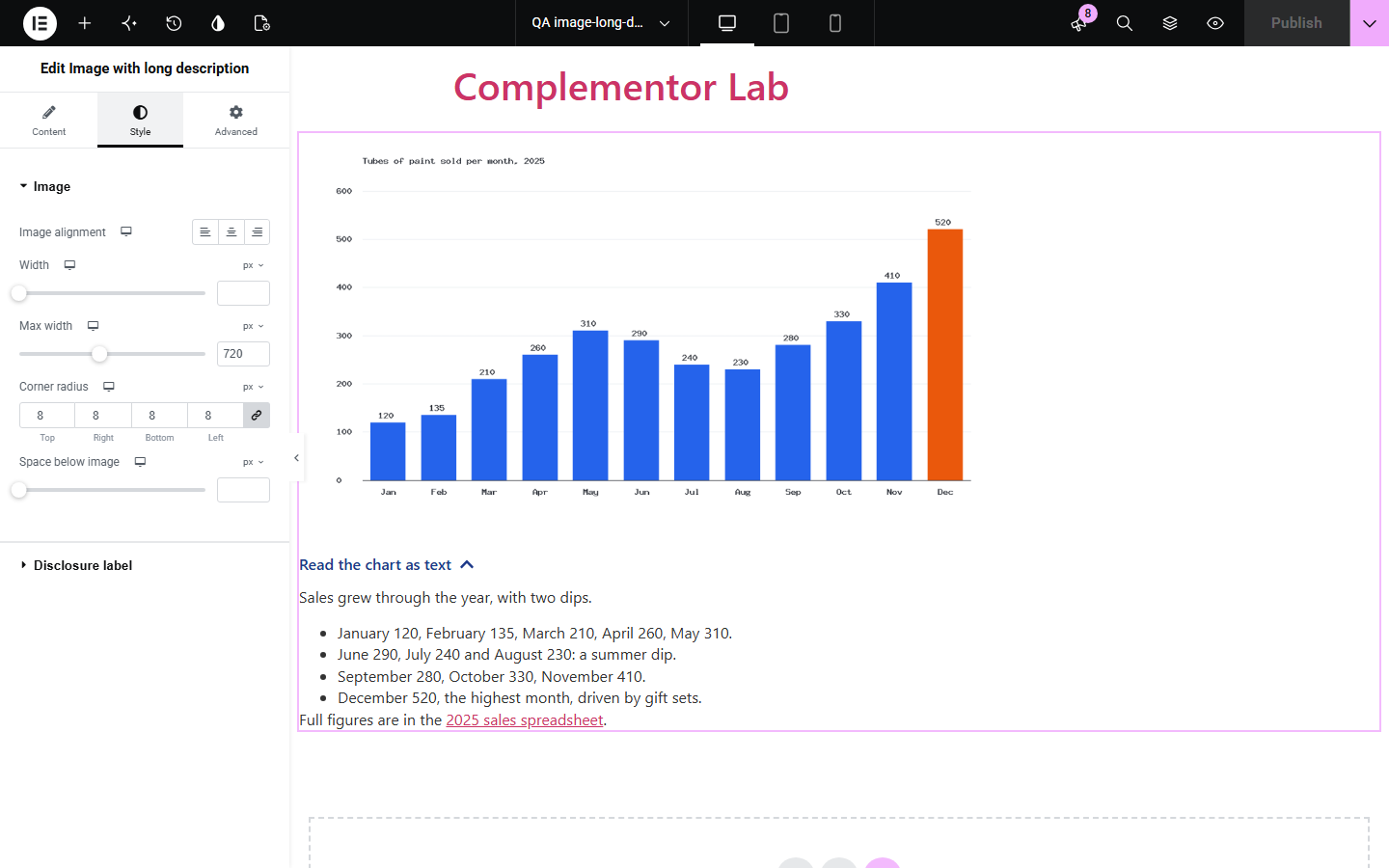
A chart or diagram carries more information than a short alt text can hold, so visitors using screen readers, and anyone who struggles to read the graphic, miss the detail. Image with long description shows the image with its alt text and a native expandable description underneath, linked to the image for assistive technology.
Give the numbers behind a chart as text.
Explain a process diagram or a floor plan step by step.
Make the content of a dense graphic available to everyone.
Start with Complementor installed and your license connected. Enable this module in the WordPress library, then configure it in Elementor.
Install Complementor, connect your license and enable Image with long description in the Complementor library.
Add the widget and choose the chart or diagram from the Media Library.
Check its short alt text, or write a custom one.
Write the full description, with lists and links if they help.
Publish and open the description to check it reads well on its own.
Configure the settings available for this module to suit the page you are building.
Media Library image with srcset and Media Library, custom or decorative alt text.
Long description with paragraphs, lists, bold, italics and links.
Native expandable section that works without JavaScript and with the keyboard.
Description linked to the image with aria-details for assistive technology.
Start open or closed, your own label and icon.
Style: image alignment, width, maximum width, radius and spacing; label typography, colours and states.
Compare the existing Elementor workflow with this Complementor module before choosing your setup.
Alt text should stay short; screen readers read it in one go with no structure. A long description can have paragraphs and lists.
A visible caption takes space for everyone. The expandable description stays tucked away until it is wanted.
Complementor uses classic Elementor APIs. Atomic-native controls are not implemented. Check your theme, cache and integrations on a staging site before release.
Check these settings if the published page behaves differently from the editor.
No image is chosen, the image belongs to private content, or the description is empty and the widget is set to hide when empty.
Only paragraphs, line breaks, bold, italics, lists and links are kept, so the description stays readable and safe.
Add alt text in the Media Library or write a custom alt; otherwise the image is treated as decorative.
Yes. Turn on Expanded by default.
No. It works with the free version of Elementor.
No. It uses the browser's own expandable section.
Yes. The image keeps its alt text, the description is linked with aria-details, and the label opens with Enter or Space.
Yes. Links to web pages, email addresses and phone numbers are kept.
Yes, but a long description usually means the image carries information, so short alt text is recommended.
This module is included with all 1007 current Complementor solutions. Choose your production website allowance; every plan includes the same modules.
Renews at $29 USD each year.
Renews at $49 USD each year.
Renews at $99 USD each year.
Applicable taxes extra. Annual subscriptions renew automatically unless canceled in your customer account. Elementor Pro is required for Exclude current post. Read the terms and 14-day technical-issue refund policy.