Features on a public listing
Display the selected amenities from an ACF Checkbox field on the current listing post. Only selected, defined choices appear.
 I Build Elementor.
Display saved ACF Select, Checkbox or Radio choices as a customizable list.
Compare actual native-rendered Checkbox and Radio samples: a vertical label list, grouped inline labels with values, a stored value and explicit empty cases. Native Elementor styles drive the customization. The synthetic export is not a live ACF connection to your site.
Source chooses One field or Selected fields. Behaviour sets empty hide/message. Display controls labels/values/both, headings, layout and optional icons. Style contains the list surface, responsive spacing/alignment and icon position/color/size/gap; enabled headings reveal a separate Field headings section.
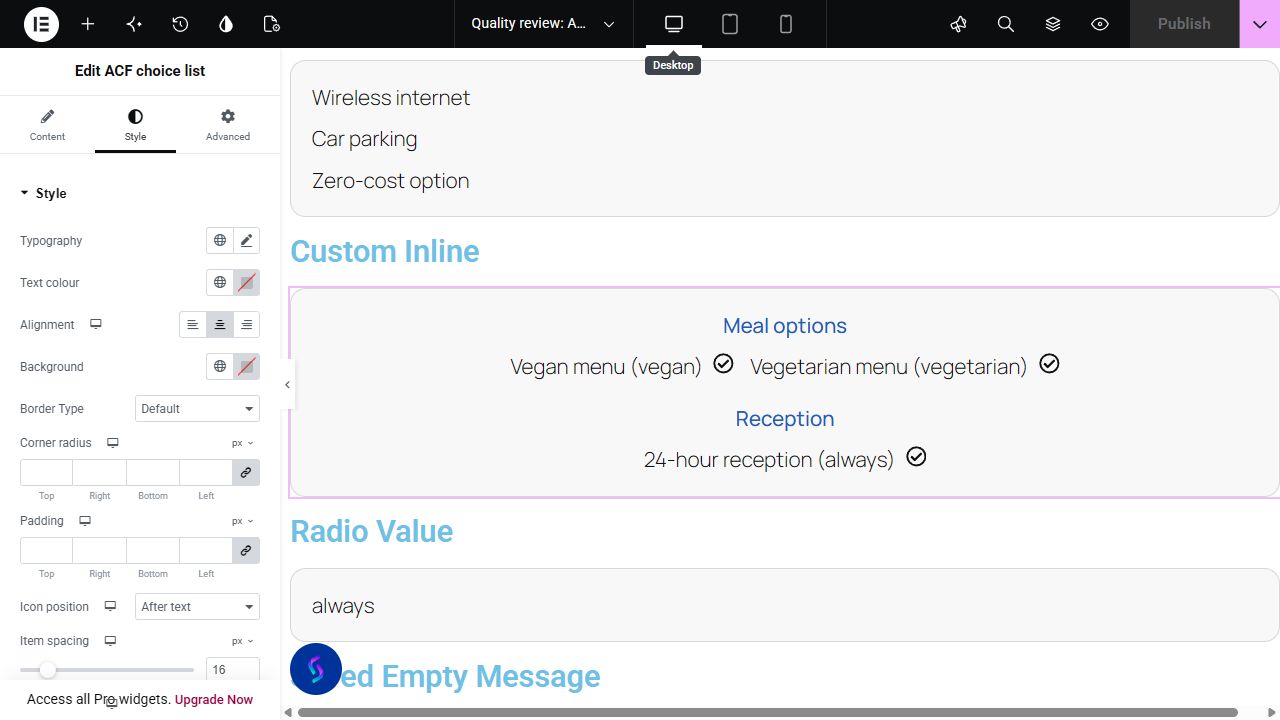
Selected ACF choices often need a readable list on the page. Display selections from one or several top-level Select, Checkbox or Radio fields, using their choice labels, stored values or both.
Display the selected amenities from an ACF Checkbox field on the current listing post. Only selected, defined choices appear.
List chosen services from a multi-select field using readable labels. Stored values can be shown when internal codes are useful to readers.
Select several choice fields and show their field labels as headings. A Radio field can supply one category beside a Checkbox feature list.
Start with Complementor installed and your license connected. Enable this module in the WordPress library, then configure it in Elementor.
Install Complementor and Advanced Custom Fields, connect your license and enable ACF choice list. Supported field types do not need ACF Pro.
Create an active applicable top-level Select, Checkbox or Radio field, define its choices and save actual selections on the source post/page.
Edit the source in Elementor. Add the widget and select One field or an ordered set of Selected fields.
Choose labels, values or both, optional headings, vertical/inline layout and empty hide/message behavior. Optionally enable a native icon.
Style the neutral surface, heading typography and responsive spacing/alignment. Publish, reopen and verify the intended public source.
Configure the settings available for this module to suit the page you are building.
Choose one or several applicable top-level Select, Checkbox or Radio fields. Key/name aliases resolve to actual schema without duplicate groups.
Show labels, stored values or both, with no heading, field label or field name. Groups follow selected-field order; items follow configured choice order.
Choose vertical or wrapping inline layout with responsive item/field spacing and alignment. Optional native icons have before/after placement, color and responsive size/gap.
Hide empty output or use an escaped editable message. Unsaved defaults and undefined stored choices do not create items.
Customize list typography/color, background, border, responsive padding and radius. Native controls can remove the neutral surface.
When headings are enabled, a separate Style section controls heading typography, color and responsive spacing.
Compare the existing Elementor workflow with this Complementor module before choosing your setup.
Icon List suits manually maintained amenities or services. Complementor resolves saved ACF labels/order and groups selected fields, reducing manual duplication when those values change.
Elementor documents Select, Checkbox and Radio support through its ACF dynamic content integration. Check the providers and formatting available in your edition first. Complementor adds configured-choice ordering, grouped fields, explicit label/value presentation and empty handling in a dedicated list widget; it is not the only way to display ACF data.
Complementor uses classic Elementor APIs. Atomic-native controls are not implemented. Check your theme, cache and integrations on a staging site before release.
Check these settings if the published page behaves differently from the editor.
Confirm ACF is active, the field has a supported top-level type and its location rules apply to the current editor post. Nested repeater fields and options-page fields are not supported.
Save actual selections on the public post, verify the selected field and confirm each stored value still exists in its configured choices. A valid source with no matching selections follows your hide/message setting; private, password-protected or missing sources are suppressed entirely.
Refresh page, hosting and CDN caches, then check the published post directly. Verify its visibility, saved field values and ACF location rules before testing template placements.
Yes. Choose an applicable saved top-level Checkbox field and vertical or inline layout. Only selected defined choices appear.
Yes. Choose Labels, Stored values or Labels and values. Saved selections are mapped against the current field’s choice definitions.
Yes. Choose Selected fields and show field labels or names. Heading typography, color and spacing have independent native controls.
An unsaved default is not a persisted selection. Save actual values on the source; empty saved data follows your hide/message setting.
Supported basic field types work through the direct reader with classic Elementor. Pro templates, loops, repeaters and Options Pages are not verified integrations.
Yes. Choose an optional native icon and style its position/color/size/gap. Background, border, padding and radius controls restyle or strip back the surface.
This module is included with all 1007 current Complementor solutions. Choose your production website allowance; every plan includes the same modules.
Renews at $29 USD each year.
Renews at $49 USD each year.
Renews at $99 USD each year.
Applicable taxes extra. Annual subscriptions renew automatically unless canceled in your customer account. Elementor Pro is required for Exclude current post. Read the terms and 14-day technical-issue refund policy.