Related articles on blog posts
Show 'More from the journal' under each article without repeating the article itself.
 I Build Elementor.
Keep the post a visitor is reading out of Elementor Pro Posts and Loop Grid lists on that same post, using one Query ID.
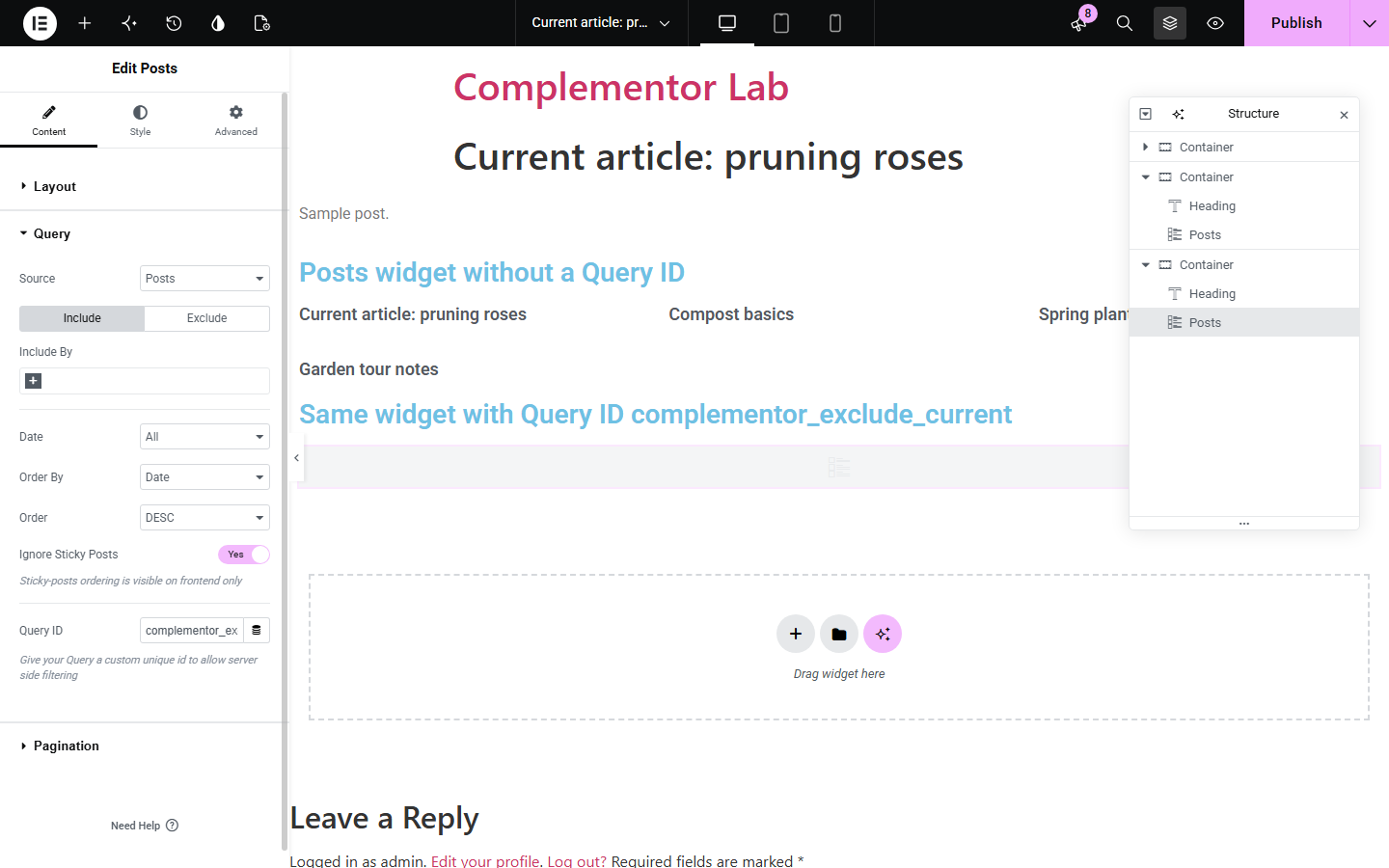
The illustration compares a query with and without the exclusion. The screenshots below are actual captures: the Query ID entered in an Elementor Pro Posts widget, and the published post where the tagged list no longer contains the current article.
Exclude current post is a query extension, so it adds no widget. Open the Query section of an Elementor Pro Posts or Loop Grid widget and enter complementor_exclude_current in the Query ID field. Source, include/exclude rules, ordering and pagination keep working as configured.
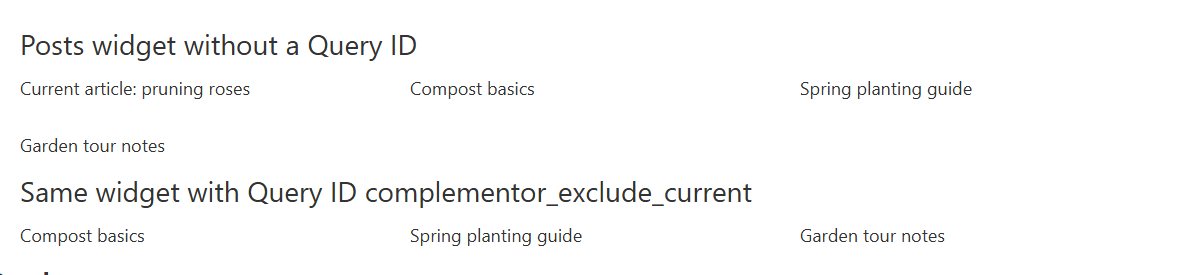
A 'More articles' or 'Related posts' list on a single post template usually includes the article the visitor is already reading. Exclude current post removes that post from any Elementor Pro query you tag with its Query ID, while the rest of your query settings stay as they are.
Show 'More from the journal' under each article without repeating the article itself.
On a portfolio or service post type, list the other entries from the same query on every single page.
Add the Query ID once in a Theme Builder single template so every post it renders excludes itself.
Start with Complementor installed and your license connected. Enable this module in the WordPress library, then configure it in Elementor.
Install Complementor with Elementor Pro, connect your license and enable Exclude current post in the Complementor library.
Open the single post template, or the post itself, in Elementor and select the Posts or Loop Grid widget that lists other posts.
In Content › Query, enter complementor_exclude_current in the Query ID field.
Keep your existing Source, Include/Exclude, Order By and Pagination settings; the extension only removes the post being viewed.
Publish and open a published post: the list shows other posts and fills the same number of slots when more posts exist.
Configure the settings available for this module to suit the page you are building.
One Query ID, complementor_exclude_current, entered in the Query section of Elementor Pro query widgets such as Posts and Loop Grid.
Removes the currently viewed post on single posts, pages and custom post types, and keeps any posts you already excluded.
When the query uses a manual Include list, the current post is also removed from that list so it cannot reappear.
Works alongside your existing source, taxonomy, ordering, offset and pagination settings without changing them.
Compare the existing Elementor workflow with this Complementor module before choosing your setup.
Elementor Pro's Exclude › Avoid Duplicates skips posts already shown by other widgets on the page, and you can exclude chosen posts by hand. Prefer those when the duplicates come from other widgets or a fixed list; use this extension when the post being read must always be left out.
Elementor documents custom query filters for developers. Write your own callback if you need more complex rules; this extension packages the common current-post exclusion so no code is needed.
Complementor uses classic Elementor APIs. Atomic-native controls are not implemented. Check your theme, cache and integrations on a staging site before release.
Check these settings if the published page behaves differently from the editor.
The editor renders widgets through a background request that is not the single post view, so the exclusion is applied on the published page. Open the published post or the preview to check the result.
Check that the Query ID is exactly complementor_exclude_current, that Exclude current post is enabled in the Complementor library and that Elementor Pro is active. Archive and listing pages are not changed because there is no single current post.
If your query matches only a few posts, removing the current post leaves one fewer item. With more matching posts the next post fills the slot.
A widget has one Query ID. If you already use a custom Query ID for your own code, add the exclusion to that callback instead.
Yes. The Query ID field belongs to Elementor Pro query widgets such as Posts and Loop Grid. Without Elementor Pro the module cannot be enabled.
Elementor Pro widgets with a Query section that offers a Query ID, such as Posts and Loop Grid. It was verified with the Posts widget on a published single post.
No. It only acts when a single post, page or custom post type entry is being viewed.
No. Your existing exclusions are kept and the current post is added to them.
It adds no widget, script or stylesheet. It adjusts the query of the tagged widget only.
This module is included with all 1007 current Complementor solutions. Choose your production website allowance; every plan includes the same modules.
Renews at $29 USD each year.
Renews at $49 USD each year.
Renews at $99 USD each year.
Applicable taxes extra. Annual subscriptions renew automatically unless canceled in your customer account. Elementor Pro is required for Exclude current post. Read the terms and 14-day technical-issue refund policy.