Article metadata beside the title
Place estimated minutes near the author and publication details. The current-page source works with standard post text or supported Elementor article widgets.
 I Build Elementor.
Estimate reading time from page content, selected ACF text fields, or both.
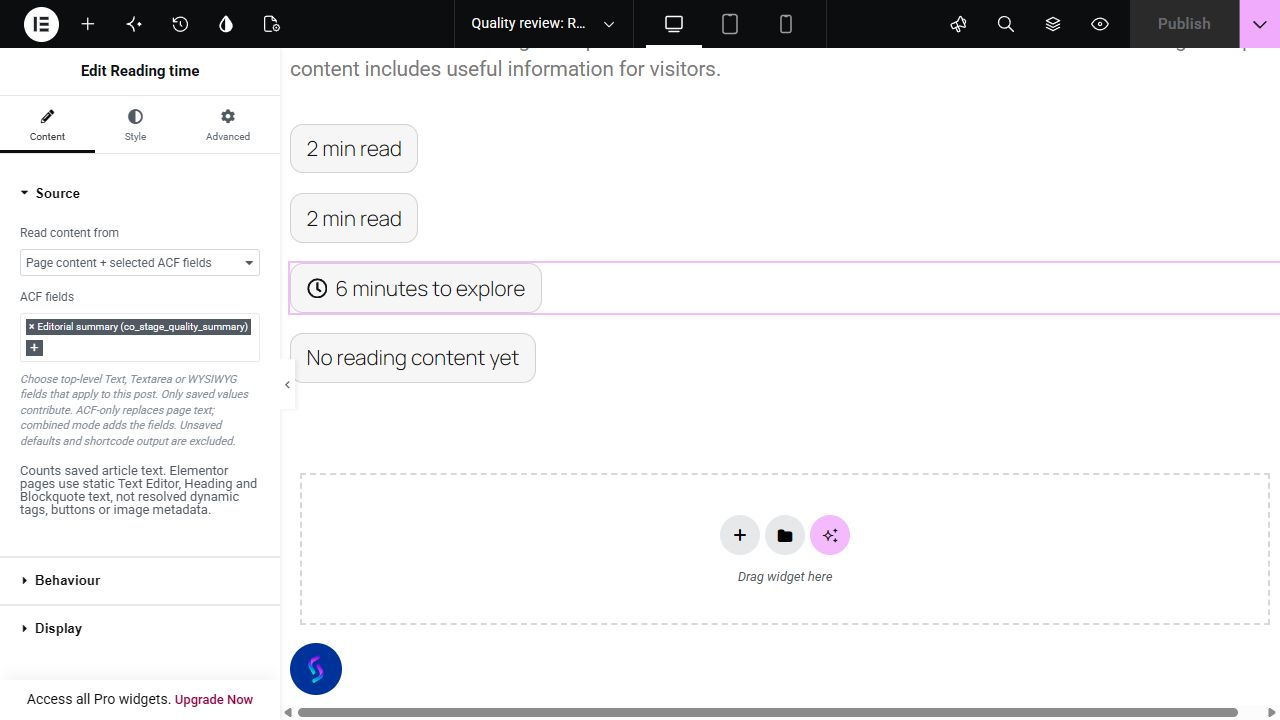
Compare actual native output for a 400-word sample article, a persisted 200-word ACF text field and their combined 600 words. At 200 words per minute they produce two, one and three minutes. Empty and customized cases use the same widget renderer and native styles; no live site data is fetched.
Choose Page content, Selected ACF fields or their combination in Source. Behaviour contains Words per minute and the empty-content policy. Display contains the minutes suffix, empty label and optional icon; Style controls the metadata surface and responsive icon placement.
A reading time label helps visitors judge an article’s length before starting. Complementor estimates minutes from the current page, selected ACF text fields, or both using your chosen words-per-minute rate. Put the result beside the title or introduction without maintaining a minutes label by hand.
Place estimated minutes near the author and publication details. The current-page source works with standard post text or supported Elementor article widgets.
Estimate a custom editorial field containing text, textarea or WYSIWYG content. Specify the fields belonging to the current post rather than counting unrelated page text.
Combine the article body with selected ACF text fields when both contain distinct reading content. Avoid including a field that duplicates text already in the page.
Start with Complementor installed and your license connected. Enable this module in the WordPress library, then configure it in Elementor.
Install Complementor, connect your license and enable Reading time. ACF is needed only when you choose an ACF source.
Add Reading time to the intended article page and choose Page content, Selected ACF fields or Page content + selected ACF fields in Source.
For ACF, select applicable top-level Text, Textarea or WYSIWYG fields and save their actual values on the source post. Unsaved field defaults contribute no words.
Set Words per minute and the empty-content policy in Behaviour. Edit Label after time and Empty content label in Display, then optionally enable a native icon.
Style typography, the neutral badge surface and responsive icon placement. Publish and confirm the estimate on the intended public article; ACF selection through a Pro template preview is not verified.
Configure the settings available for this module to suit the page you are building.
Choose page text, selected ACF fields only, or page text plus selected fields. The ACF picker uses actual applicable top-level Text, Textarea and WYSIWYG schema.
Set Words per minute from 50 to 1,000. Counted words are divided by that rate and rounded up to whole minutes.
Choose to hide an empty source or show an editable empty-content label. Change the suffix after the minutes independently in Display.
Customize inherited typography/color, background, border, responsive alignment, padding and radius. The subtle default badge can be restyled or stripped back with those controls.
Choose an optional native icon with its own color, responsive size and gap; place it before, after, above or below the text.
Compare the existing Elementor workflow with this Complementor module before choosing your setup.
A regular text widget can display a reading-time value you calculate yourself. This works for a static article, but you must revisit the number when you edit the content.
Other WordPress plugins and Elementor addons provide reading estimates. If yours already handles the content you use, you may not need another module. Check which builder widgets and dynamic content each implementation counts.
Post Info’s date and time metadata describes publication information. A publication time is different from the estimated minutes needed to read an article; choose the field that matches your intended label.
Complementor uses classic Elementor APIs. Atomic-native controls are not implemented. Check your theme, cache and integrations on a staging site before release.
Check these settings if the published page behaves differently from the editor.
Check the selected source and saved text. Page mode counts static supported article text; ACF mode uses only selected persisted fields. Shortcodes, arbitrary dynamic output and media duration are excluded.
Activate ACF, check top-level Text/Textarea/WYSIWYG type and the field group’s location rules for the actual editor post, then reopen the editor. Template-preview selection is not verified.
Save a real value on the source post. The widget distinguishes persisted metadata from an unsaved ACF default. Empty totals follow your Behaviour setting; combined mode still counts the page.
Remove selected fields that duplicate page text. Refresh cached published HTML after a content change, and check the estimate against the intended public article rather than unrelated editor/template context.
Counted words are divided by your words-per-minute setting and rounded up. A 400-word source at 200 words per minute produces two minutes.
Yes. Select applicable persisted top-level Text, Textarea or WYSIWYG fields. ACF-only replaces page text; combined mode adds it. Page-only mode does not need ACF.
It counts saved static Text Editor, Heading and Blockquote text. It does not resolve dynamic tags, shortcode output or arbitrary third-party widgets.
Yes. Edit the minutes suffix and empty label in Display. Native Style controls change typography, colors, border, padding, radius and responsive icon position, size and gap.
Choose an editable empty-content label or hide the output. Unsaved ACF defaults contribute no words; unavailable private or missing source posts are suppressed.
This module is included with all 1007 current Complementor solutions. Choose your production website allowance; every plan includes the same modules.
Renews at $29 USD each year.
Renews at $49 USD each year.
Renews at $99 USD each year.
Applicable taxes extra. Annual subscriptions renew automatically unless canceled in your customer account. Elementor Pro is required for Exclude current post. Read the terms and 14-day technical-issue refund policy.