A copyright line in the footer
Combine the copyright symbol, current year and business name without editing the year manually. Page caches must still refresh before visitors receive the new HTML.
 I Build Elementor.
Keep your footer's copyright year up to date automatically.
Compare native-rendered copyright lines, a year-only example, a valid range and optional icon styling. Sample HTML uses the WordPress site timezone when the demo was generated; it is not your site’s live clock.
Content source contains Before year, After year and optional Starting year. Display enables the native icon and its before/after position. Style controls the line’s surface and typography, with a conditional Icon section for color and responsive size/gap.
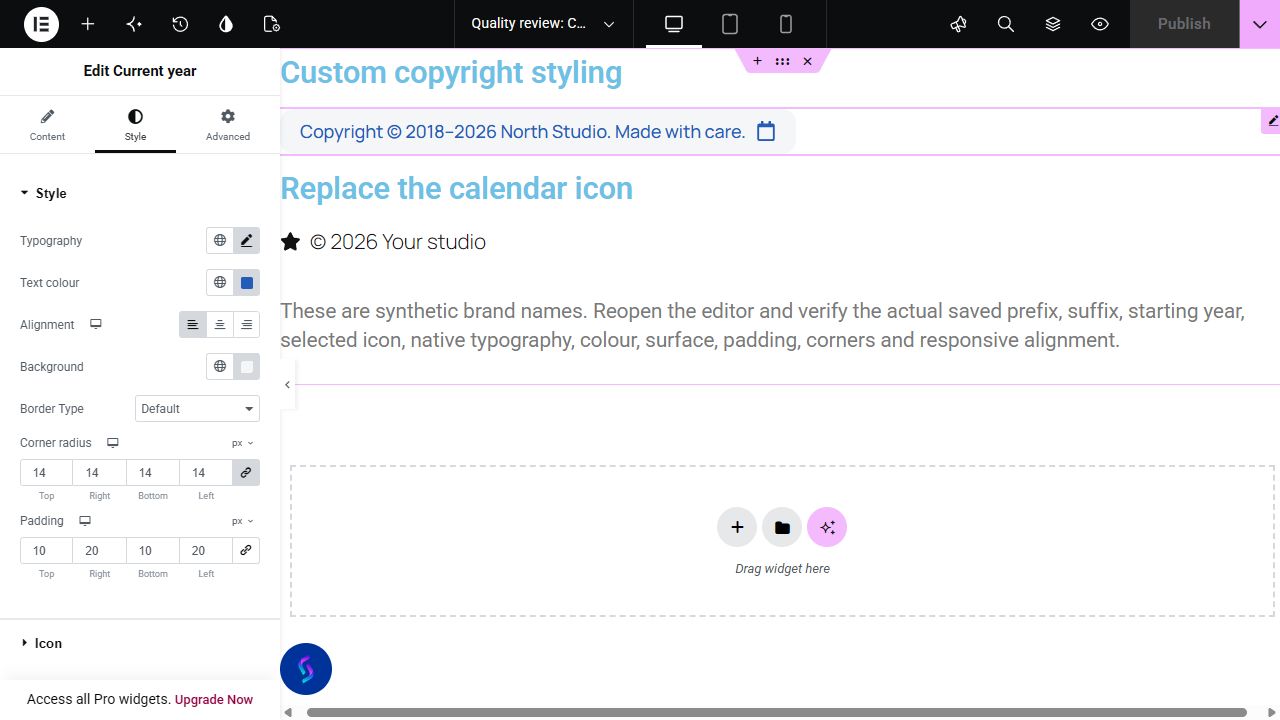
A footer with a manually typed year needs an edit each January. Complementor renders the current year using your WordPress site timezone, with text before and after it. An optional starting year lets you display a copyright range such as 2020–2026.
Combine the copyright symbol, current year and business name without editing the year manually. Page caches must still refresh before visitors receive the new HTML.
Enter the year your business or site began. When that year is earlier than the current year, the widget displays a range instead of a single year.
Use available dynamic tags for text around the year when your Elementor setup supports them. The widget’s own year follows WordPress, while footer template availability depends on your theme or Elementor edition.
Start with Complementor installed and your license connected. Enable this module in the WordPress library, then configure it in Elementor.
Install Complementor, connect your license and enable Current year. No ACF dependency is needed.
Add the widget to an Elementor page or an available footer layout. Theme-wide footer availability depends on your theme or Elementor edition.
Set Before year and After year in Content source; defaults use the copyright symbol and actual site title.
Optionally enter a whole four-digit Starting year earlier than the current year. Enable a native icon in Display and choose before/after placement.
Style typography, surface and responsive spacing, publish and check the line. Refresh page caches after the site year changes.
Configure the settings available for this module to suit the page you are building.
Edit Before year and After year; native dynamic-tag providers depend on your edition and installed integrations.
Enter an optional whole four-digit starting year from 1000 to 9999. A range appears only when it is earlier than the current site year.
Enable an optional native icon with before/after position in Display; set its color and responsive size/gap in Style.
Customize inherited typography/color, background, border, responsive alignment, padding and radius.
Compare the existing Elementor workflow with this Complementor module before choosing your setup.
Elementor documents a Current Date Time provider. If your edition exposes suitable year formatting, it can handle a simple year. Complementor adds an earlier-start range and surrounding text controls in a dedicated widget.
A shortcode can generate the server-side year, or a regular text widget can show a manually updated year. Keep your existing approach when it meets your needs; a custom shortcode still needs maintenance.
Complementor uses classic Elementor APIs. Atomic-native controls are not implemented. Check your theme, cache and integrations on a staging site before release.
Check these settings if the published page behaves differently from the editor.
Refresh the relevant WordPress, hosting and CDN page caches so the footer renders again. Complementor does not automatically purge those caches when January begins.
A range is shown only when Starting year is at least 1000 and earlier than the current year. A blank, future or current-year value produces the current year alone.
Check the timezone under WordPress Settings → General. The widget uses the WordPress site date, so the year near midnight at New Year can differ from a visitor in another timezone.
The widget reads the WordPress site year when the page renders. ACF and Pro dynamic tags are not needed for that calculation.
Yes. Enter a whole four-digit Starting year earlier than the current site year. An en dash separates the starting and current years.
A cache may still serve HTML rendered before the year changed. Refresh the relevant WordPress, host and CDN caches.
Yes. Edit After year, which defaults to the site title. Enable a native icon with before/after placement, then set its color and responsive size/gap alongside native text/surface controls.
No. It follows the WordPress site timezone, which can differ from a visitor’s local date around New Year.
This module is included with all 1007 current Complementor solutions. Choose your production website allowance; every plan includes the same modules.
Renews at $29 USD each year.
Renews at $49 USD each year.
Renews at $99 USD each year.
Applicable taxes extra. Annual subscriptions renew automatically unless canceled in your customer account. Elementor Pro is required for Exclude current post. Read the terms and 14-day technical-issue refund policy.