An availability label
Show a saved editorial flag as Available or Unavailable. Keep the ACF value current; this does not check booking availability.
 I Build Elementor.
Show saved ACF True / False values with editable labels and optional state icons.
This interactive illustration uses sample fields and values. It does not connect to ACF or WordPress. Change the settings to explore the output; the installed widget reads saved fields on the current public post.
Select a top-level True / False field in Source. Choose false and missing behavior separately, edit both labels and optionally select independent state icons.
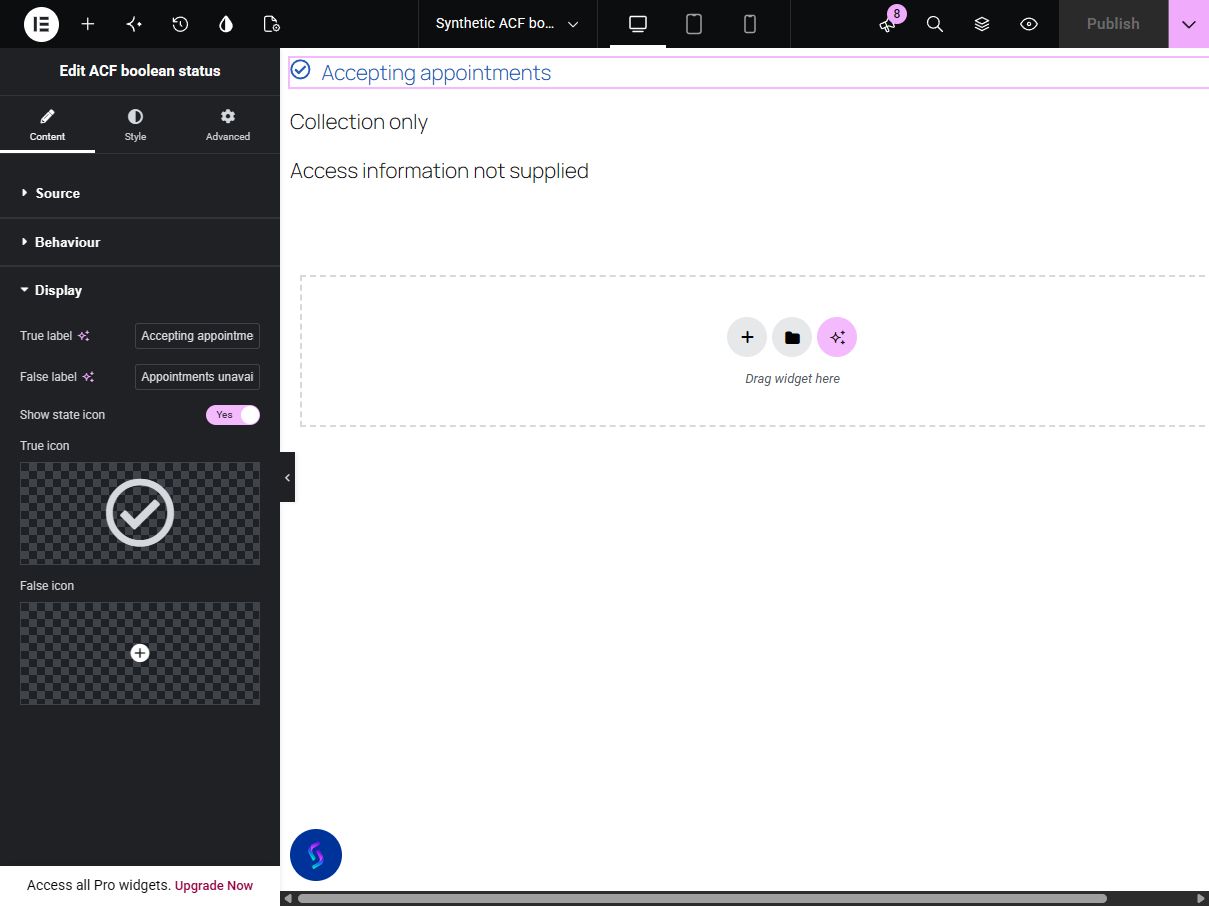
A saved yes/no field is easier to understand as a clear label than a raw 1 or 0. Display a chosen ACF True / False field as two editable statuses, with missing data treated separately from a saved false value.
Show a saved editorial flag as Available or Unavailable. Keep the ACF value current; this does not check booking availability.
Describe a service attribute with labels such as Included and Not included. Optional distinct icons support the text rather than replacing it.
Show Reviewed or Awaiting review from a manually maintained boolean field. A saved true value is not evidence of automated fact checking.
Start with Complementor installed and your license connected. Enable this module in the WordPress library, then configure it in Elementor.
Install Complementor and Advanced Custom Fields, connect your Complementor license and enable ACF boolean status in the module library.
Create an applicable top-level True / False field group in ACF. Save a value on a published, publicly viewable post or page.
Edit that post or page with Elementor, add ACF boolean status and select the field.
Edit the True label and False label. Optionally hide false statuses, then choose whether missing saved values are hidden or show your message.
Optionally select native icons and adjust typography, icon position, size and gap. Publish and confirm the saved output on the live post.
Configure the settings available for this module to suit the page you are building.
Select an applicable top-level ACF True / False field on the current public post.
Edit the True label and False label; an empty state label hides that status.
Hide false status independently from missing-value behavior. Missing values can be hidden or use an editable message.
Choose optional independent true and false icons with Elementor’s native selector. Set shared icon color and responsive before/after position, size and text gap.
Use native text typography, color, background, border, responsive alignment, padding and corner radius controls.
Compare the existing Elementor workflow with this Complementor module before choosing your setup.
Elementor documents an ACF dynamic content integration with supported field types and fallback text. Check the fields and output available in your edition first. Complementor packages custom true/false wording and distinct missing behavior in one dedicated widget.
ACF provides PHP examples for reading fields. A maintained custom template or shortcode can format that data. A regular Elementor text widget is suitable for static labels when you are willing to update them manually.
Complementor uses classic Elementor APIs. Atomic-native controls are not implemented. Check your theme, cache and integrations on a staging site before release.
Check these settings if the published page behaves differently from the editor.
Confirm ACF is active, the field has a supported top-level type and its location rules apply to the current editor post. Nested repeater fields and options-page fields are not supported.
Save the post with the field explicitly unchecked. A stored false value is distinct from metadata that has never been saved. Check Hide false status and the false label separately.
Refresh page, hosting and CDN caches, then check the published post directly. Verify its visibility, saved field values and ACF location rules before testing template placements.
Yes. Select a supported True / False field and edit the True label and False label to the wording you need.
No. Missing persisted metadata follows the separate hide or message setting. A saved false value uses the false label unless Hide false status is enabled.
Yes. Select each optional state icon independently. Their color, responsive position, size and text gap use shared controls.
No. Hide false status hides this status output. The module is a display widget, not a page-wide conditional visibility engine.
The direct reader uses the supported basic ACF field types with classic Elementor. It does not depend on Elementor Pro dynamic tags. Pro templates, loops, repeaters and options pages are not verified integrations.
This module is included with all 1007 current Complementor solutions. Choose your production website allowance; every plan includes the same modules.
Renews at $29 USD each year.
Renews at $49 USD each year.
Renews at $99 USD each year.
Applicable taxes extra. Annual subscriptions renew automatically unless canceled in your customer account. Elementor Pro is required for Exclude current post. Read the terms and 14-day technical-issue refund policy.