An article revision date
Display the saved modification date beside the article title or publication information. Describe it as an update date, rather than evidence that the article was fact-checked.
 I Build Elementor.
Show a public post’s modification date, optionally only after a chosen update interval.
Compare native-rendered dates from synthetic public WordPress posts with saved publication/modification records. Examples include formats, optional icons and customized styling. Unavailable and below-interval cases intentionally show no date; these are not your live content records.
In Source, choose the current post or a selected public Post ID. Behaviour contains the updated-only switch and minimum interval. Display contains labels, date formats, optional time and an optional native icon.
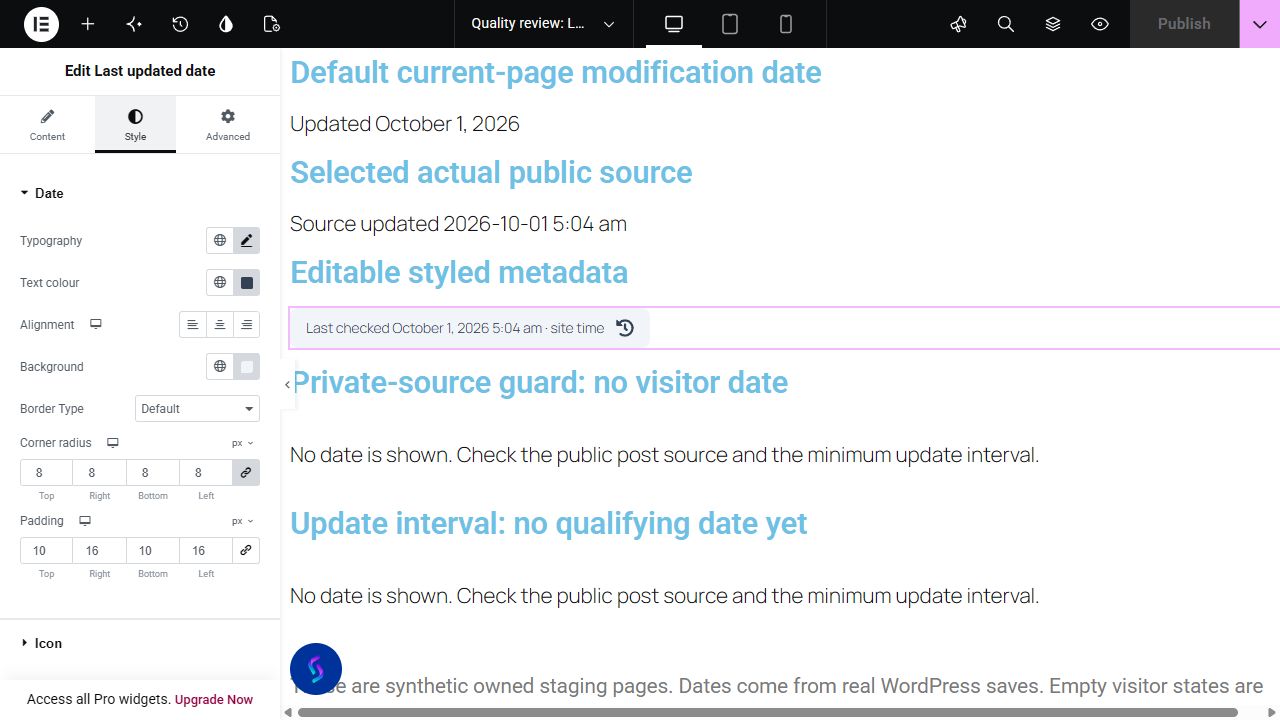
A manually maintained Updated label can become out of sync with a page. Complementor displays the WordPress modification timestamp for the current public post or a selected public resource. Choose the date format, optional time and whether the modification must be sufficiently later than publication.
Display the saved modification date beside the article title or publication information. Describe it as an update date, rather than evidence that the article was fact-checked.
Show the last saved date on a guide, instructions page or public documentation page. Readers can see the WordPress record date without an editor maintaining a separate text label.
Choose a published, publicly viewable Post ID when the label should describe another resource. Private, draft and password-protected sources are excluded.
Start with Complementor installed and your license connected. Enable this module in the WordPress library, then configure it in Elementor.
Install Complementor, activate your license and enable Last updated date in the module library.
Add Last updated date to the public post or page. Keep Current post or page, or choose Selected public post and enter its Post ID.
Optionally enable Show only after an update and set Minimum hours after publication. The modification must be later than that interval.
Choose Before date, After date and Date format. Enable Include time if required; it uses WordPress time settings.
Optionally choose a native icon, style the text and spacing, then publish and check the source date on the live page.
Configure the settings available for this module to suit the page you are building.
Choose the current post/page or a selected public source with a positive integer Post ID.
Optionally require modification strictly later than publication plus a 0–8760-hour minimum interval.
Choose site, Long, Short, ISO or custom WordPress date tokens. Blank custom format uses the site format; Include time uses the site time format.
Edit surrounding text with available native dynamic-tag providers. This is not a dedicated ACF date-field source.
Customize typography, colors, background, border, responsive alignment, padding and radius; optional native icons have separate color and responsive before/after position, size and gap.
Compare the existing Elementor workflow with this Complementor module before choosing your setup.
Elementor Pro provides date/time metadata through Post Info and dynamic content workflows. Check the date sources available in your edition or existing shortcode first. Complementor groups a public-post source, modification interval and presentation controls into one dedicated widget.
A normal text widget can show a date you choose editorially. That may be appropriate for a reviewed-on date. Complementor shows the WordPress modification timestamp instead; saving unrelated changes can update that timestamp.
Complementor uses classic Elementor APIs. Atomic-native controls are not implemented. Check your theme, cache and integrations on a staging site before release.
Check these settings if the published page behaves differently from the editor.
Check that the source is published and publicly viewable, has no password, and uses a valid Post ID. If Show only after an update is enabled, the modification must be later than publication plus the selected minimum interval.
The widget reads the WordPress modification record. WordPress saves can change this value without a substantive editorial revision. Use a separately maintained editorial date if your label needs to mean reviewed or fact-checked.
Check the WordPress site timezone and date/time settings, then refresh relevant page caches. For template and loop placements, verify the actual published post source before relying on the output.
Yes. Use the current public source or a positive public Post ID to display its saved WordPress modification date.
Yes. Enable Show only after an update and optionally set a minimum interval. Modification must be strictly later than publication plus that interval; equality stays hidden.
No. Other WordPress saves can change the modification record. Maintain a separate editorial date when you need a reviewed-on label.
Yes. Display supports site/preset/custom formats, optional time and surrounding text. Native styles and optional icon controls customize presentation.
A selected published, publicly viewable Post ID is supported. An ACF date field is not a source for this widget.
The same saved GMT instant is displayed in the current WordPress site timezone. Older records lacking GMT data use the local-date fallback.
This module is included with all 1007 current Complementor solutions. Choose your production website allowance; every plan includes the same modules.
Renews at $29 USD each year.
Renews at $49 USD each year.
Renews at $99 USD each year.
Applicable taxes extra. Annual subscriptions renew automatically unless canceled in your customer account. Elementor Pro is required for Exclude current post. Read the terms and 14-day technical-issue refund policy.