Software and game downloads
Show how long an installer or update takes on common connections.
 I Build Elementor.
Let visitors see how long a download or upload takes from a file size and a connection speed, with an overhead allowance and a speed comparison.
These are the actual published outputs of the widget with sample sizes and speeds. Change a number or a unit to see the estimate update.
Calculation sets decimal or binary size units, the starting size and speed with their units, an allowance for overhead and the speeds to compare. Behaviour switches live calculation, the bytes-per-second line and the Clear button. Labels holds every text. The Style tab covers the fields and unit lists, the result box and comparison table, labels and messages, the widget and the buttons.
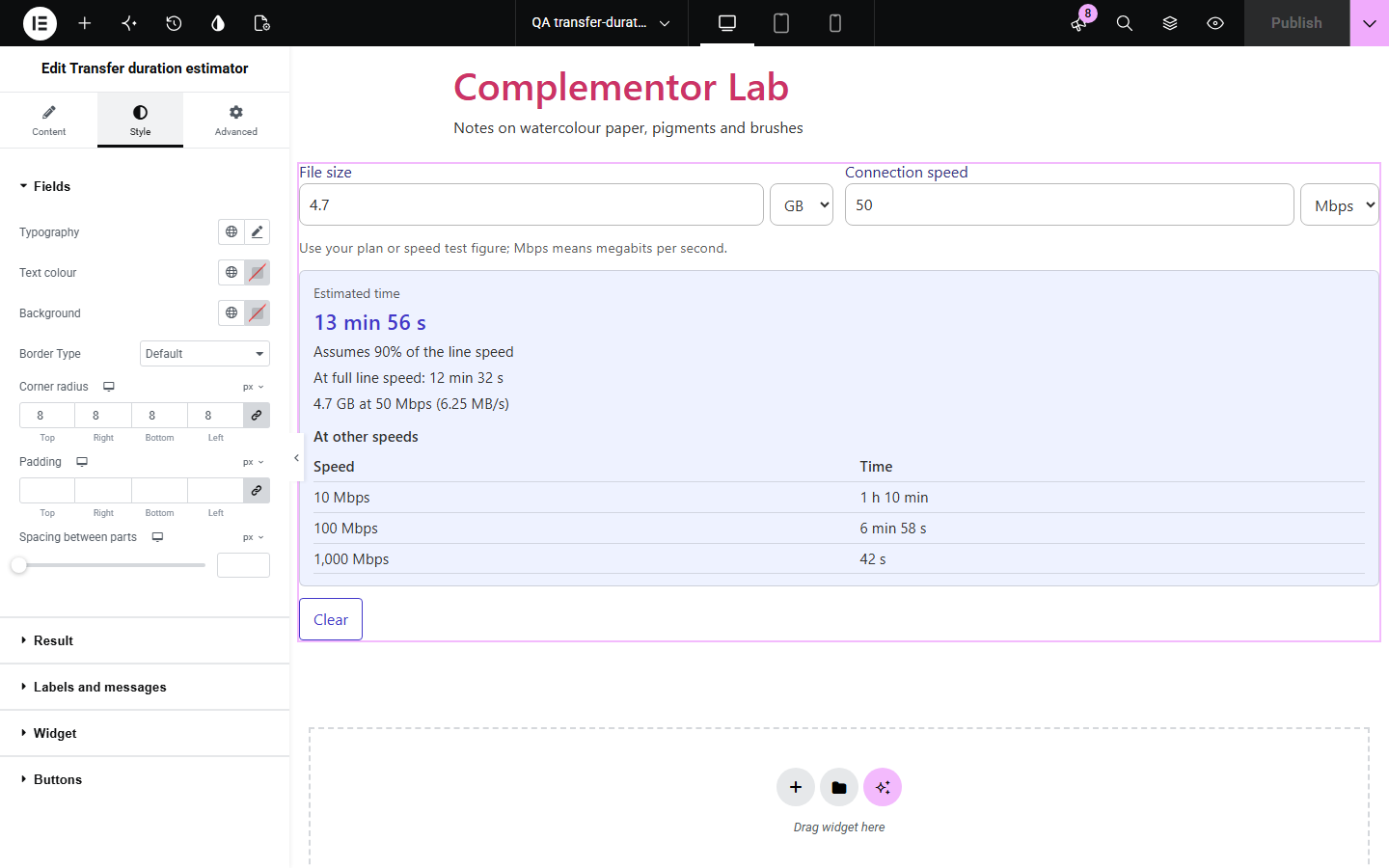
Software, game, course and media sites publish file sizes in GB while visitors know their connection in Mbps, and the factor of eight between bytes and bits trips almost everyone up. Transfer duration estimator sits on your own page: visitors type the size and their speed, each with a unit, and see a readable time such as 13 min 56 s, the speed read as bytes per second, an optional allowance for overhead and a table of times at other speeds. Nothing is sent anywhere.
Show how long an installer or update takes on common connections.
Help learners plan video or audio downloads before a trip.
Estimate how long an upload of a site or photo library takes at a given upload speed.
Start with Complementor installed and your license connected. Enable this module in the WordPress library, then configure it in Elementor.
Install Complementor, connect your license and enable Transfer duration estimator in the Complementor library.
Add the widget to a page, for example next to a download button or a file list.
Under Calculation, choose decimal or binary units and optionally set a starting size and speed with their units.
Optionally add an allowance for overhead and speeds to compare, then adjust the texts under Labels and Behaviour.
Style the fields, result and buttons under Style, then change a number to check the estimate.
Configure the settings available for this module to suit the page you are building.
Size in bytes, kB, MB, GB or TB, in decimal (1 GB = 1,000 MB) or binary (1 GiB = 1,024 MiB) units.
Speed in kbps, Mbps, Gbps or MB/s, with a line reading it the other way, such as 100 Mbps = 12.5 MB/s.
Readable times from under 0.1 s to days, such as 2 min 40 s or 4 h 27 min.
Allowance for overhead from 0 to 90%, with the full-speed time shown beside the estimate.
Optional table of times at up to 8 speeds you list, such as 10, 100 and 1,000 Mbps.
Results as visitors type or with a Calculate button and optional icon; Style sections for fields, result, table, labels and buttons.
Compare the existing Elementor workflow with this Complementor module before choosing your setup.
Enough when visitors only need the size; it leaves the bits-and-bytes conversion and the time to them.
Show numbers you set; they do not calculate a time from what visitors enter.
Measures or converts elsewhere and takes visitors away from your page.
Complementor uses classic Elementor APIs. Atomic-native controls are not implemented. Check your theme, cache and integrations on a staging site before release.
Check these settings if the published page behaves differently from the editor.
File sizes are in bytes and internet speeds in bits, and a byte has 8 bits. The detail line shows the speed in bytes per second, such as 100 Mbps = 12.5 MB/s.
Windows counts 1 GB as 1,024 MB (binary units). Choose binary units under Calculation to match it; they are labelled GiB and MiB.
Protocol overhead, Wi-Fi and busy servers lower the speed. Set an allowance for overhead, for example 10, to assume 90% of the line speed.
A comma followed by three digits is read as a thousands separator, which is not accepted so it cannot be mistaken for a decimal comma. Type 1000, or 1 000 with a space.
No. It works with the free version of Elementor.
No. Visitors type their speed, for example from their plan or a speed test; the widget makes no network test.
Yes, with a point or a comma, such as 1.5 or 1,5.
Yes. List up to 8 speeds under Calculation and a table shows the time at each.
Yes. Without it a short message is shown instead.
This module is included with all 1007 current Complementor solutions. Choose your production website allowance; every plan includes the same modules.
Renews at $29 USD each year.
Renews at $49 USD each year.
Renews at $99 USD each year.
Applicable taxes extra. Annual subscriptions renew automatically unless canceled in your customer account. Elementor Pro is required for Exclude current post. Read the terms and 14-day technical-issue refund policy.