Blog topic index
Show readers every subject you write about on a Topics page or under each post.
 I Build Elementor.
List the categories, tags or product categories of your site as a linked directory, with optional post counts, icons and columns.
These are the actual published outputs of the widget on a sample gardening blog: the default list of top-level categories, the sub-topics of Gardening as pills, three columns with counts, and the message shown when a category has no sub-topics yet.
Content › Source picks the taxonomy and whether to list top-level terms or the children of one parent term, chosen from a searchable list. Behaviour hides empty terms, sets the order and the maximum number. Display adds a heading, picks a vertical list, wrapping row or columns, and sets the post count text, an icon and a message for when nothing matches. The Style tab covers the term links with underline, typography, colours, Normal, Hover and Focus states, border, radius and padding, plus the heading, spacing, count and icon.
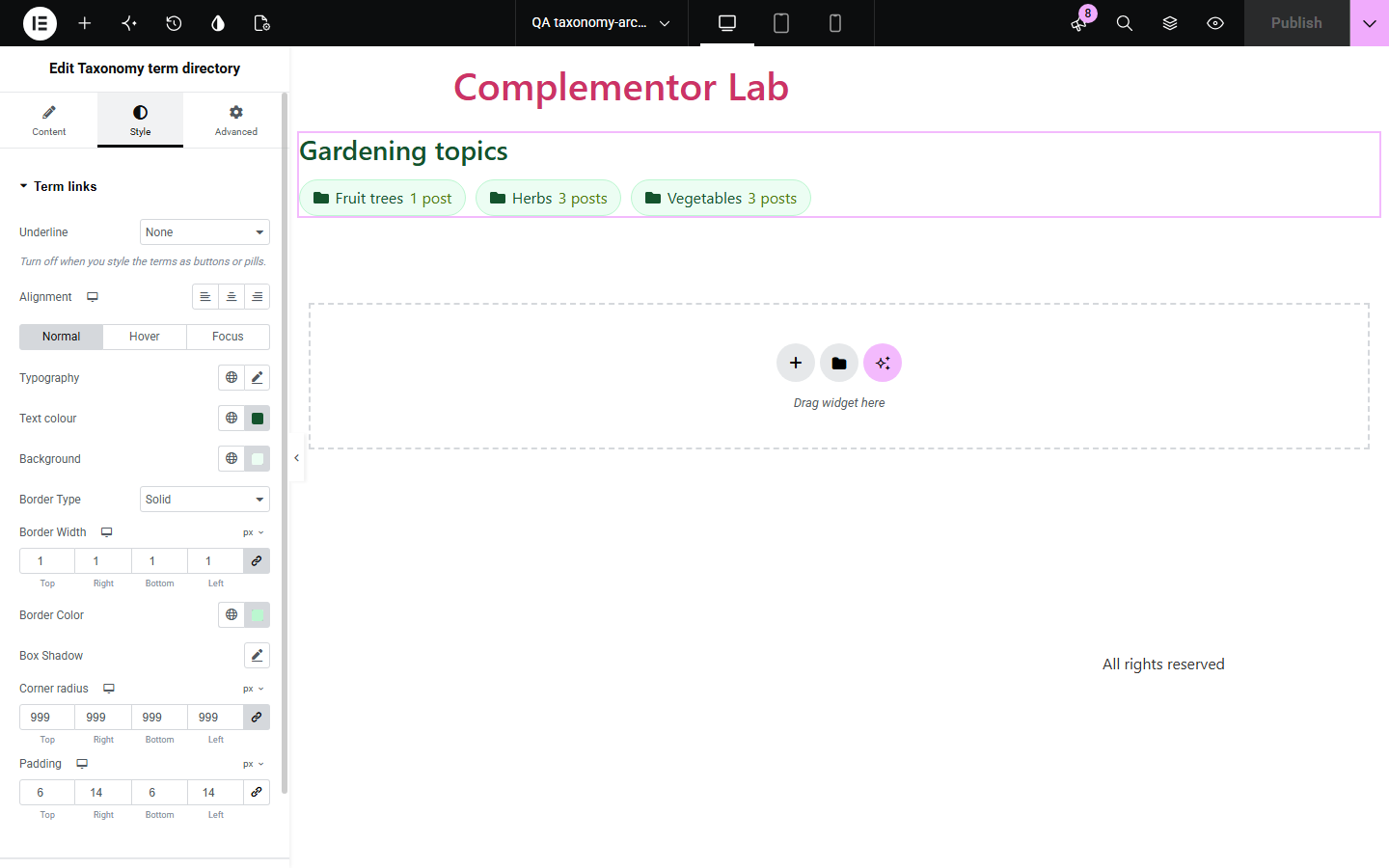
Readers who land on one post rarely see what else your site covers, and hand-built topic lists go stale as categories change. Taxonomy term directory lists the terms of one category, tag or product taxonomy as links, read live from WordPress, with the counts kept in step as you publish.
Show readers every subject you write about on a Topics page or under each post.
List product categories or the subcategories of one department as pills.
Add the sub-topics of a category to the top of its archive page.
Start with Complementor installed and your license connected. Enable this module in the WordPress library, then configure it in Elementor.
Install Complementor, connect your license and enable Taxonomy term directory in the Complementor library.
Add the widget to a page, sidebar or archive template.
Choose the taxonomy, then top-level terms or the children of one parent term.
Pick a layout, and turn on post counts or an icon if you want them.
Style the links, publish, and check that each link opens its archive page.
Configure the settings available for this module to suit the page you are building.
Any public taxonomy with archive pages: categories, tags, product categories, product tags and custom taxonomies.
Top-level terms or the direct children of one parent term picked from a list.
Hide or show empty terms; order by name, post count or creation order; up to 100 terms.
Vertical list, wrapping row or 1 to 6 responsive columns, with an optional heading.
Post counts with your own text and a singular form, and an optional icon before each term.
Style: underline, typography, colours, Normal, Hover and Focus states, border, radius, padding, spacing and icon size.
Compare the existing Elementor workflow with this Complementor module before choosing your setup.
The core blocks list categories and tags in the block editor and widget areas. Use them there; use this widget inside Elementor layouts or for other taxonomies.
A menu lists terms you choose by hand and does not change when you add categories. This widget reads the terms each time the page loads.
Complementor uses classic Elementor APIs. Atomic-native controls are not implemented. Check your theme, cache and integrations on a staging site before release.
Check these settings if the published page behaves differently from the editor.
It has no published posts and Hide terms without published posts is on, or it is below the maximum number of terms.
The parent term was deleted or belongs to another taxonomy, or no terms match. In the editor a note explains which.
Counts include only published posts assigned directly to the term, not posts in its sub-terms.
Only public taxonomies with archive pages are offered, so the links always lead somewhere.
No. It works with the free version of Elementor.
Yes. Product categories, product tags and product brands can be listed like any other taxonomy.
No. It lists one level: top-level terms or the direct children of one parent.
Yes. It is a navigation region named by its heading or the taxonomy name, with a list of links and a visible focus outline.
Yes. New terms and new posts are reflected the next time the page loads.
This module is included with all 1007 current Complementor solutions. Choose your production website allowance; every plan includes the same modules.
Renews at $29 USD each year.
Renews at $49 USD each year.
Renews at $99 USD each year.
Applicable taxes extra. Annual subscriptions renew automatically unless canceled in your customer account. Elementor Pro is required for Exclude current post. Read the terms and 14-day technical-issue refund policy.