Blog search
Suggest other words when nothing matches.
 I Build Elementor.
Show a helpful message, with the visitor's own search words, only when a search on your site finds nothing.
These are the actual published outputs of the widget on a real search for the misspelling “sourdogh”: the default message, a friendly callout, and a short heading.
Content sets the message with % for the search words, text before and after, a fallback, the HTML tag and an optional icon. In the editor, which is never an empty search, a styled sample lets you preview the design. The Style tab covers typography, colour, alignment, background, border, radius and padding, plus icon position, size, gap and colour.
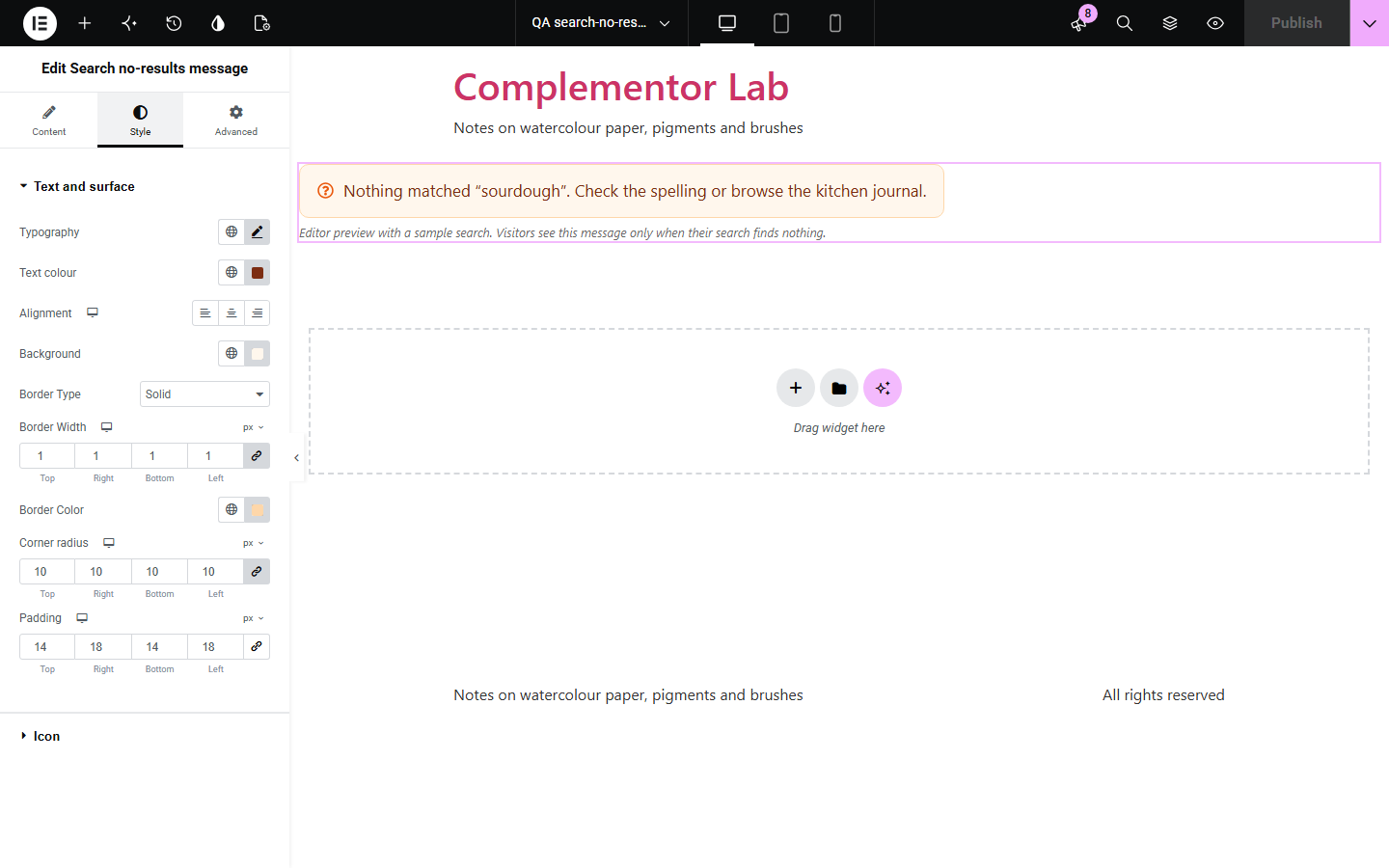
When a search finds nothing, a blank results area leaves visitors unsure whether the page failed. Search no-results message appears only on searches with zero results, repeats what the visitor typed so a typo is easy to spot, and stays out of the way on every other page.
Suggest other words when nothing matches.
Point shoppers to categories when a product search fails.
Suggest contacting support when no article matches.
Start with Complementor installed and your license connected. Enable this module in the WordPress library, then configure it in Elementor.
Install Complementor, connect your license and enable Search no-results message in the Complementor library.
Open the template used for search results.
Add the widget and write the message, with % for the search words.
Optionally add an icon.
Style it, publish, and run a search that finds nothing to check.
Configure the settings available for this module to suit the page you are building.
Shown only when a search finds nothing.
Your own message, with % for the search words.
Search words stripped of markup and escaped.
Paragraph by default, or a heading.
Styled sample in the editor for designing.
Style: typography, colour, surface, icon.
Compare the existing Elementor workflow with this Complementor module before choosing your setup.
Theme messages are fixed and often generic. This one is yours and repeats the search.
A static note shows even when results exist. This appears only when nothing is found.
Complementor uses classic Elementor APIs. Atomic-native controls are not implemented. Check your theme, cache and integrations on a staging site before release.
Check these settings if the published page behaves differently from the editor.
It appears only on searches that find nothing. Try searching for a made-up word.
The editor is never a search, so a sample is shown for styling.
WordPress lists all posts for an empty search, so it has results.
No. Place a search form widget next to it.
No. It works with the free version of Elementor, inside any search results template.
Yes. The search words are stripped of markup and escaped before display.
Yes, on product searches that use the WordPress search results page.
Yes. It is ordinary text in the tag you choose, and the optional icon is hidden from screen readers.
No. It is plain HTML and CSS.
This module is included with all 1007 current Complementor solutions. Choose your production website allowance; every plan includes the same modules.
Renews at $29 USD each year.
Renews at $49 USD each year.
Renews at $99 USD each year.
Applicable taxes extra. Annual subscriptions renew automatically unless canceled in your customer account. Elementor Pro is required for Exclude current post. Read the terms and 14-day technical-issue refund policy.