Plugin and theme sellers
Show which WordPress and PHP versions each release supports.
 I Build Elementor.
Show what a release works with in an accessible table: minimum and tested versions, a status in words and notes, with a last checked date.
These are the actual published outputs of the widget with sample values.
Content sets the caption, the rows in a repeater (component, minimum version, tested up to, status and notes), the status column and symbols and the last checked date, plus every column heading and status word. The Style tab covers cells, lines, stripes, padding, header, caption and a colour for each status.
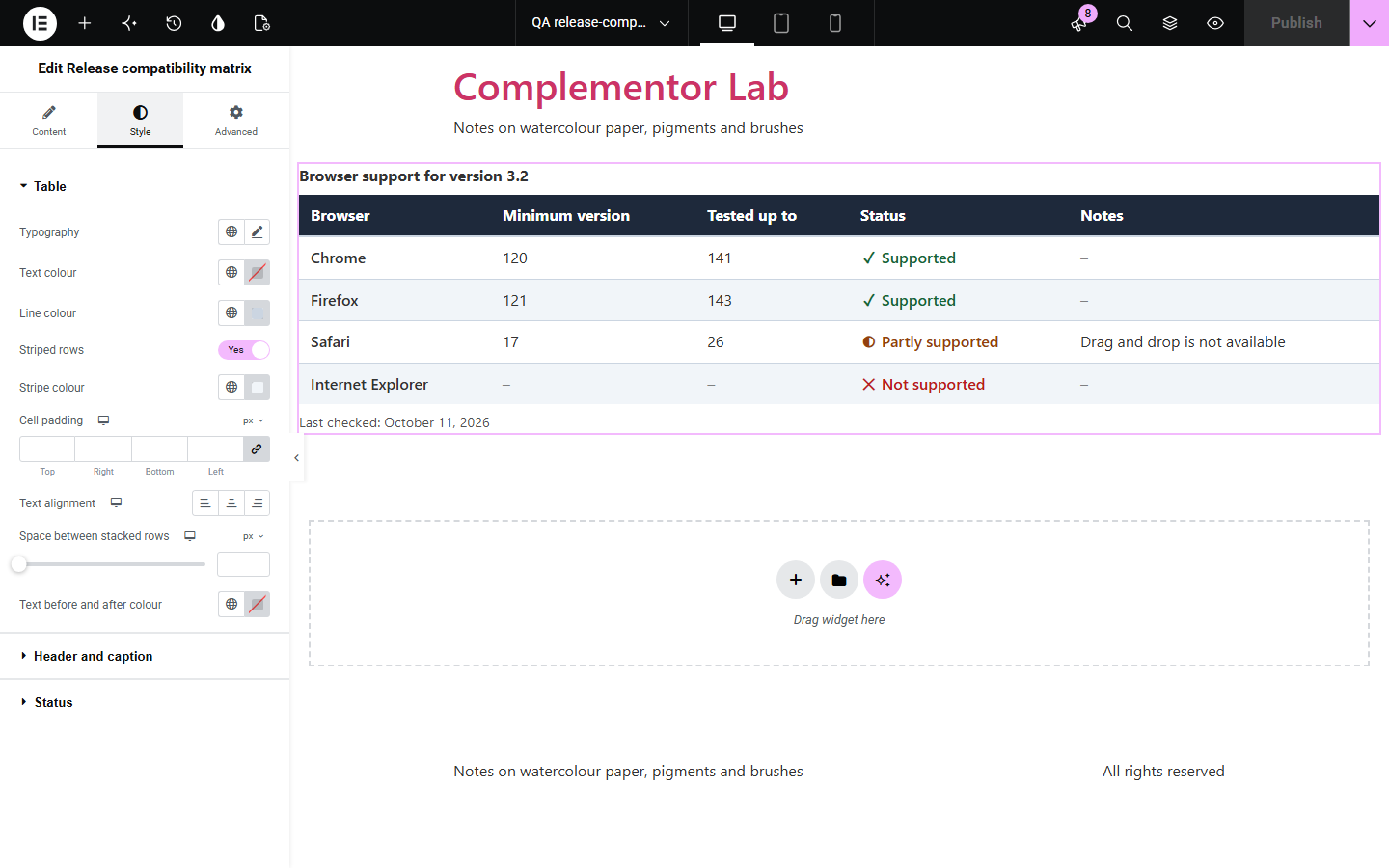
Release notes and product pages often state requirements in a sentence or a screenshot of a table, so customers cannot see at a glance what is supported, and screen readers cannot read it at all. Release compatibility matrix builds a real captioned table from simple rows: each component with its minimum version, the version it is tested up to, a status in words and a note. Empty columns are left out, and a “last checked” date shows how current it is.
Show which WordPress and PHP versions each release supports.
List supported browsers and systems for each version.
Show which models a product works with.
Start with Complementor installed and your license connected. Enable this module in the WordPress library, then configure it in Elementor.
Install Complementor, connect your license and enable Release compatibility matrix in the Complementor library.
Add the widget to a release notes or product page.
Write a caption and add a row for each component.
Set the versions, status and notes, and the last checked date.
Style the header, rows and status colours.
Configure the settings available for this module to suit the page you are building.
Captioned table with row headers.
Minimum and tested versions.
Status in words and symbols.
Empty columns left out.
Last checked date.
Scrolls sideways on phones.
Compare the existing Elementor workflow with this Complementor module before choosing your setup.
Cannot be read by screen readers or updated quickly.
Works, but has no status words, empty column handling or checked date.
Complementor uses classic Elementor APIs. Atomic-native controls are not implemented. Check your theme, cache and integrations on a staging site before release.
Check these settings if the published page behaves differently from the editor.
Columns that are empty in every row are left out. Fill in at least one cell.
Rows without a component are skipped. Add the component name.
On narrow screens the table keeps its columns readable and scrolls inside its own area.
It uses the date format from Settings > General.
No. It works with the free version of Elementor.
No. It shows only the versions and statuses you enter.
Yes. Every column heading and status word can be changed.
Yes. It uses a captioned table with column and row headers, and statuses never rely on colour alone.
No. The table is plain HTML.
This module is included with all 1007 current Complementor solutions. Choose your production website allowance; every plan includes the same modules.
Renews at $29 USD each year.
Renews at $49 USD each year.
Renews at $99 USD each year.
Applicable taxes extra. Annual subscriptions renew automatically unless canceled in your customer account. Elementor Pro is required for Exclude current post. Read the terms and 14-day technical-issue refund policy.