Site migrations
Check where old relative links will point on new pages.
 I Build Elementor.
Let visitors resolve relative links against a base address and see the full address, kind and any pitfalls for each, one per line.
These are the actual published widgets running in your browser; enter your own base and links to try them.
Addresses sets the starting base (or the page the widget is on) and links, the Use this page button and the most links. Behaviour turns link kinds and live updates on or off. Labels sets the heading and every label and button. The Style tab covers the layout, links box height, results, fields and buttons.
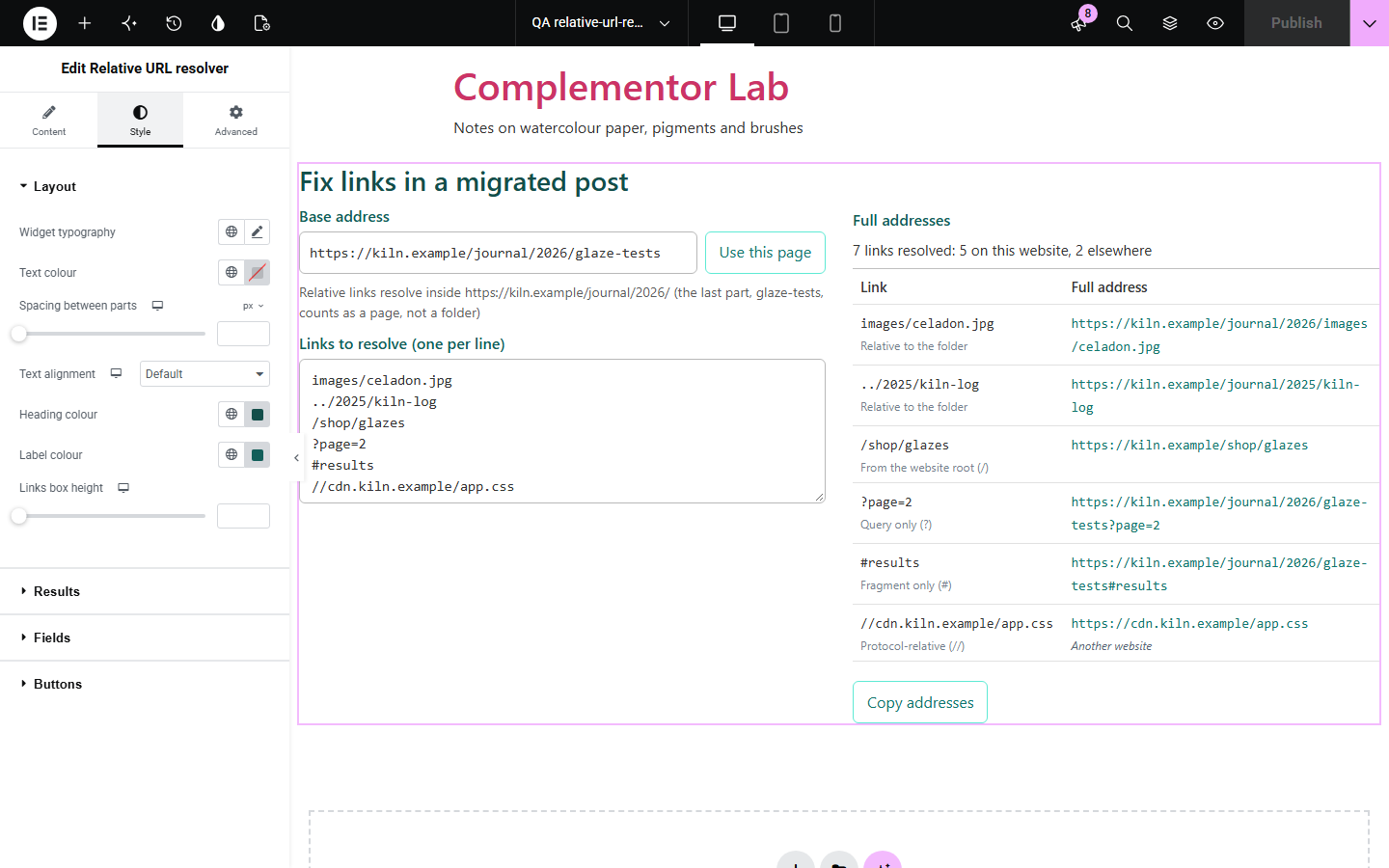
A relative link such as ../images/photo.jpg means something different on every page, and a base that ends without a slash changes the folder it counts from. Relative URL resolver shows the full address each link points to, using the same rules as browsers, and explains the folder, the kind of link and pitfalls such as ../ above the root.
Check where old relative links will point on new pages.
Turn relative links from page source into full addresses.
Show how ../ and / links are read.
Start with Complementor installed and your license connected. Enable this module in the WordPress library, then configure it in Elementor.
Install Complementor, connect your license and enable Relative URL resolver in the Complementor library.
Add the widget to a developer, SEO or migration help page.
Leave the base empty to start from the current page, or enter an example base address.
Add starting links, one per line, to show visitors how they resolve.
Style the results table, then check the full addresses.
Configure the settings available for this module to suit the page you are building.
Any number of links, one per line, resolved against one base address.
The folder relative links count from, with the page part explained.
Link kinds: full address, protocol-relative, from the root, relative to the folder, query only and fragment only.
Notes for ../ above the top folder, another website and switching to http.
javascript: and data: links skipped; href="…" and <…> unwrapped.
A Use this page button and Copy addresses.
Live updates or a Resolve button.
Compare the existing Elementor workflow with this Complementor module before choosing your setup.
Splits one address into its parts.
Finds the links in pasted text.
Complementor uses classic Elementor APIs. Atomic-native controls are not implemented. Check your theme, cache and integrations on a staging site before release.
Check these settings if the published page behaves differently from the editor.
When the base does not end with a slash, its last part counts as a page; links resolve in the folder that contains it. Add a slash to treat it as a folder.
Steps above the website root have nowhere to go, so browsers ignore them; the note marks those links.
It runs code instead of pointing to an address, so it has no full address.
Relative links need a full base to resolve against; start it with http:// or https://.
No. It works with the free version of Elementor.
No. Everything runs in the visitor’s browser and links are not visited.
Yes. It uses the browser’s own URL parser.
Yes. href="…" and src="…" are unwrapped first.
Yes. Leave the base empty or press Use this page.
This module is included with all 1007 current Complementor solutions. Choose your production website allowance; every plan includes the same modules.
Renews at $29 USD each year.
Renews at $49 USD each year.
Renews at $99 USD each year.
Applicable taxes extra. Annual subscriptions renew automatically unless canceled in your customer account. Elementor Pro is required for Exclude current post. Read the terms and 14-day technical-issue refund policy.