Venue enquiry details
Display a saved enquiries email and reception telephone beside venue information, omitting a contact channel when no value is saved.
 I Build Elementor.
Display selected saved ACF email, telephone and website fields in one ordered contact list.
This illustration uses sample fields Enquiries, Reception and Venue website, shown in selected order. Include a blank Reception variant and ordinary text that stays unlinked. These are sample values, not live recipients or proof of a phone/mail app launch.
Source selects applicable Email, URL and Text fields. Display controls field labels and optional type-specific native icons. Style controls responsive alignment/spacing, icon placement and link states; field labels originate in the ACF definition.
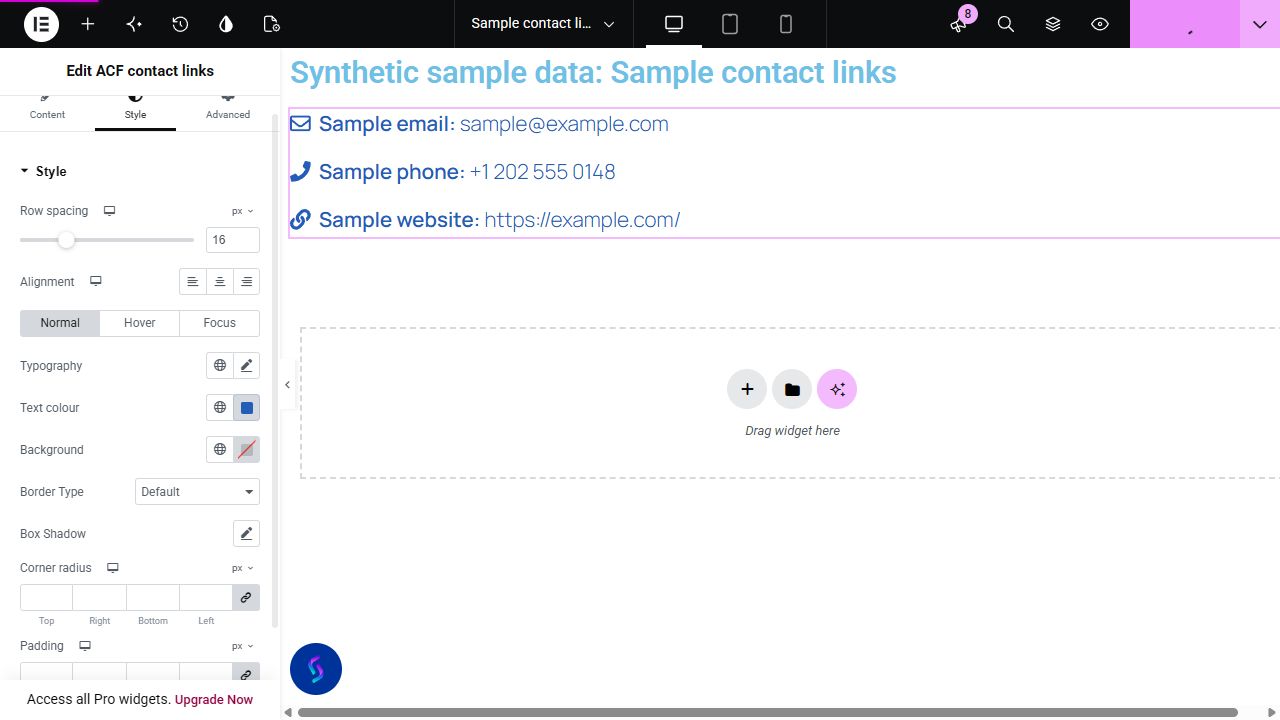
A staff or venue page can store an email, phone number and website in separate ACF fields. Display those selected saved values together without maintaining another contact list inside the page layout.
Display a saved enquiries email and reception telephone beside venue information, omitting a contact channel when no value is saved.
Select a staff member email, phone-like Text field and professional website without exposing unrelated profile metadata.
Show a partner website with a plain Text contact note; text that is not phone-like remains visible without a misleading telephone link.
Start with Complementor installed and your license connected. Enable this module in the WordPress library, then configure it in Elementor.
Install the reviewed Complementor package with Advanced Custom Fields and classic Elementor, connect your license and enable ACF contact links in the module library.
Create an applicable ACF group with top-level Email, URL and Text fields. Use Text for phone data; ACF has no dedicated phone field type in the tested runtime.
Save contact values on a published, passwordless post or page. Configure useful field labels in ACF.
Add ACF contact links to that page in Elementor, select the fields in the intended order and choose whether field labels and icons are shown.
Use Style for responsive list alignment, row spacing, icon position, size, gap and link states. Publish and confirm the saved selection and links on the frontend.
Configure the settings available for this module to suit the page you are building.
Ordered multiple field selector; only applicable top-level Email, URL and Text fields. Duplicate key/name aliases collapse; processing is bounded to 50 selections.
Optional field labels and native icon selections per contact type. Icons default off; cleared icon selections stay cleared.
Responsive left/centre/right alignment positions the list items as well as their text. Row spacing, inherited typography/colours and link Normal/Hover/Focus styles remain native Elementor controls.
Conditional responsive icon position/size/gap and icon colour; native padding/radius and Elementor Advanced.
Compare the existing Elementor workflow with this Complementor module before choosing your setup.
Text, buttons and manually authored links can present a small contact block in Elementor Free. Prefer that workflow when the information is maintained in the page; this widget combines selected saved ACF fields and omits invalid or absent contacts.
Manual mailto/tel links or supported ACF dynamic bindings can populate existing Elementor widgets. This widget centralizes selected fields and empty handling; it does not replace forms or messaging tools.
Complementor uses classic Elementor APIs. Atomic-native controls are not implemented. Check your theme, cache and integrations on a staging site before release.
Check these settings if the published page behaves differently from the editor.
Check the saved value and applicable field type. Email must validate as an address; websites need an absolute HTTP(S) URL with a host and no embedded username/password. Invalid values and configured defaults without persisted metadata are omitted.
Only a bounded phone-like value with one leading plus, digits and allowed separators becomes tel. Other text is deliberately plain text; extension parsing and arbitrary smart links are not provided.
Check field location rules, saved values and public source visibility. The frontend hides empty output; the authorized editor supplies a setup hint.
Top-level Email, URL and Text fields applicable to the current source. Text supports bounded phone-like values; other Text remains escaped plain text.
No. It renders links or text. Whether a mail or phone app opens depends on the visitor device and browser.
The saved selection order determines output. Field labels come from ACF; their visibility, icons and relevant styles are controlled in Elementor.
The tested direct-field workflow uses ACF 6.8.10 and native Elementor widgets without a Pro-specific API. Pro is not required for those field types; dynamic-tag and Theme Builder alternatives depend on the installed edition and remain separate integration checks.
It displays saved contact links and text. It does not submit forms, send messages or track contacts.
This module is included with all 1007 current Complementor solutions. Choose your production website allowance; every plan includes the same modules.
Renews at $29 USD each year.
Renews at $49 USD each year.
Renews at $99 USD each year.
Applicable taxes extra. Annual subscriptions renew automatically unless canceled in your customer account. Elementor Pro is required for Exclude current post. Read the terms and 14-day technical-issue refund policy.