Newsletters and emails
Collect every link to check or reuse.
 I Build Elementor.
Let visitors pull every web link and email address out of pasted text, cleaned and de-duplicated, as a list, Markdown, HTML or CSV.
These are the actual published widgets running in your browser; paste your own text to try them.
Text and options sets the starting text, www. links, email addresses, repeats, order, format, whether visitors can change them, the scan limit and the download name. Behaviour turns the clickable list, new tabs and live updates on or off. Labels sets the heading and every label, button and message. The Style tab covers the layout, link list, fields, output panel and buttons.
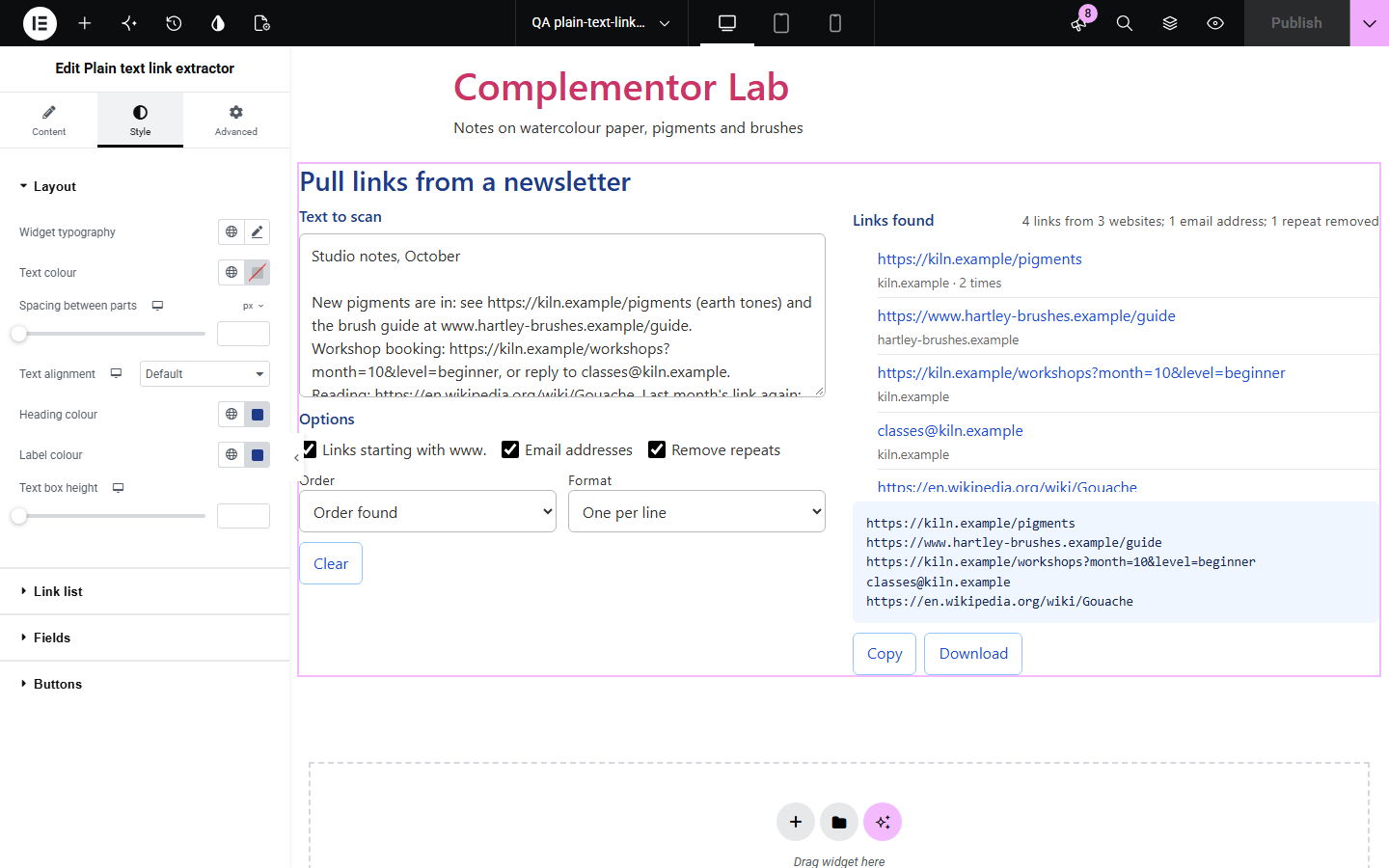
Collecting the links from an email, document or chat by hand misses some and copies others with a stray full stop or bracket. Plain text link extractor finds every web address in pasted text, trims trailing punctuation, removes repeats and gives the list ready to paste, all in the browser.
Collect every link to check or reuse.
List the links in a draft before publishing.
Turn pasted notes into a clean reading list.
Start with Complementor installed and your license connected. Enable this module in the WordPress library, then configure it in Elementor.
Install Complementor, connect your license and enable Plain text link extractor in the Complementor library.
Add the widget to a tools or resources page.
Choose whether to include www. links and email addresses, and remove repeats.
Pick the starting order and format, and whether visitors can change them.
Style the list and output panel, then paste some text to check.
Configure the settings available for this module to suit the page you are building.
Finds http and https links, links starting with www. and, optionally, email addresses.
Trims trailing punctuation, quotes and unmatched brackets, keeping brackets inside links.
Removes repeats with a count, ignoring the case of the website name.
Order found, A to Z or by website.
One per line, Markdown list, HTML list or CSV with website and count.
A clickable list, Copy, Download and Clear.
A limit on how much text is scanned.
Compare the existing Elementor workflow with this Complementor module before choosing your setup.
Builds links rather than finding them.
Breaks one link into its parts.
Complementor uses classic Elementor APIs. Atomic-native controls are not implemented. Check your theme, cache and integrations on a staging site before release.
Check these settings if the published page behaves differently from the editor.
Links need http://, https:// or www. and a website name with a dot; localhost and other schemes are skipped.
A closing bracket is kept only when the link opened one, so (see https://example.com) loses the bracket but a Wikipedia link keeps its own.
Repeats are matched with the website name in any case; turn off Remove repeats to keep every copy.
The Most characters scanned setting limits very long text; a note shows when it applies.
No. It works with the free version of Elementor.
No. Everything runs in the visitor’s browser.
No. Text is only read; links are shown as text and safe links.
Yes. Turn on Email addresses.
Yes. Choose CSV and download it.
This module is included with all 1007 current Complementor solutions. Choose your production website allowance; every plan includes the same modules.
Renews at $29 USD each year.
Renews at $49 USD each year.
Renews at $99 USD each year.
Applicable taxes extra. Annual subscriptions renew automatically unless canceled in your customer account. Elementor Pro is required for Exclude current post. Read the terms and 14-day technical-issue refund policy.