Developer documentation
Turn a spreadsheet of settings into a table for a README or wiki.
 I Build Elementor.
Let visitors paste spreadsheet cells or CSV and get a clean Markdown table with a live preview, ready to copy into README files, docs or chats.
These are the actual published widgets. Paste cells copied from a spreadsheet, or CSV, and press Make table; the Markdown, the count and the preview update in your browser.
Source sets the input label, placeholder and example data. Behaviour sets the button label, the column separator (detected or fixed), whether the first row is the header, column alignment, padding, the preview, the column and row count and the copy button. Display sets the heading and its tag, the result and preview labels and an optional icon. The Presentation tab styles text, gap, alignment, the input, both buttons with hover states, the Markdown box and the preview table.
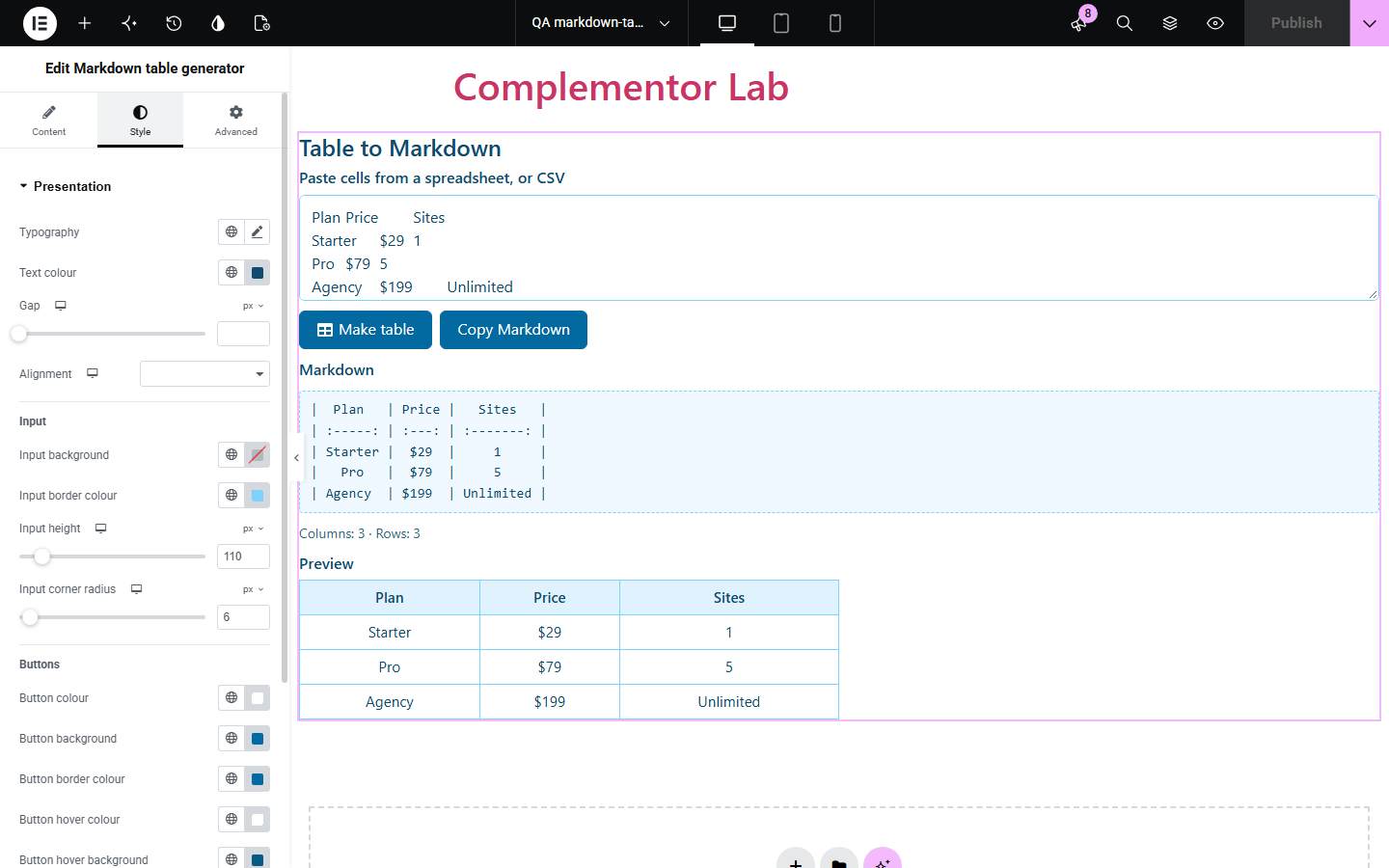
Writing Markdown tables by hand is slow: every row needs pipes, the separator line needs dashes, and pipes inside cells break the table. Markdown table generator lets visitors paste cells straight from a spreadsheet, or CSV, and get a neatly padded Markdown table with a rendered preview and a copy button. Nothing leaves the browser.
Turn a spreadsheet of settings into a table for a README or wiki.
Offer a free converter next to other Markdown helpers.
Help customers paste tidy tables into tickets, forums or chat apps that read Markdown.
Start with Complementor installed and your license connected. Enable this module in the WordPress library, then configure it in Elementor.
Install Complementor, connect your license and enable Markdown table generator in the Complementor library.
Drag the Markdown table generator widget onto the page in Elementor.
In Source, set the input label and optional example data.
In Behaviour, choose the column separator, header row, alignment and whether to show the preview.
Style the input, buttons, Markdown box and preview in Presentation, then publish and try it.
Configure the settings available for this module to suit the page you are building.
Reads tab-separated spreadsheet cells, CSV with quoted cells, or semicolon-separated data.
First row as header, or automatic Column 1, Column 2 headers.
Column alignment (left, centre, right) written as :--, :-: or --: markers.
Pads columns so the Markdown lines up; pipes in cells are escaped and line breaks become <br>.
Rendered table preview and a “Columns: 3 · Rows: 3” count.
Copy Markdown button with a fallback for sites without the Clipboard API.
Style the input, buttons with hover colours, the Markdown box and the preview header.
Compare the existing Elementor workflow with this Complementor module before choosing your setup.
Fine for a two-row table. This saves time and avoids broken rows when tables grow or cells contain pipes.
Code editors and third-party sites can convert tables too. Use this widget when your visitors need the converter on your own site, without sending data elsewhere.
Native table blocks display tables on a page. Use them to publish a table; use this widget to give visitors Markdown they can paste elsewhere.
Complementor uses classic Elementor APIs. Atomic-native controls are not implemented. Check your theme, cache and integrations on a staging site before release.
Check these settings if the published page behaves differently from the editor.
The separator was not detected. Choose Tab, Comma or Semicolon in Columns separated by.
In CSV, wrap that cell in double quotes, as spreadsheet exports do.
Rows with fewer cells than the widest row are padded with empty cells so the table stays valid.
Padding counts characters, and wide characters take two columns in most fonts. The table still renders correctly.
No. It works with the free version of Elementor.
No. Converting and copying happen in the visitor's browser; nothing is submitted or stored.
GitHub-flavoured Markdown pipe tables, which GitHub, GitLab, many wikis and chat apps understand.
Yes. Fields are labelled, buttons work with the keyboard, the count is announced as a status message, the preview uses table headers, and wide tables scroll in a focusable region.
Yes. Initial input is converted when the page loads, so visitors see the Markdown and preview straight away.
This module is included with all 1007 current Complementor solutions. Choose your production website allowance; every plan includes the same modules.
Renews at $29 USD each year.
Renews at $49 USD each year.
Renews at $99 USD each year.
Applicable taxes extra. Annual subscriptions renew automatically unless canceled in your customer account. Elementor Pro is required for Exclude current post. Read the terms and 14-day technical-issue refund policy.