Naming projects and products
Try phrases until the initials spell something good.
 I Build Elementor.
Let visitors turn phrases into acronyms, one per line, skipping small words, using inner capitals and hyphenated parts, with the letters used marked.
These are the actual published widgets running in your browser; type your own phrases to try them.
Phrases sets the starting phrases and whether visitors can change the options. Behaviour sets the style, the small words, inner capitals, hyphenated parts, the marked letters and live updates. Labels sets the heading and every label and button. The Style tab covers the layout, box height, acronyms and marked letters, fields and buttons.
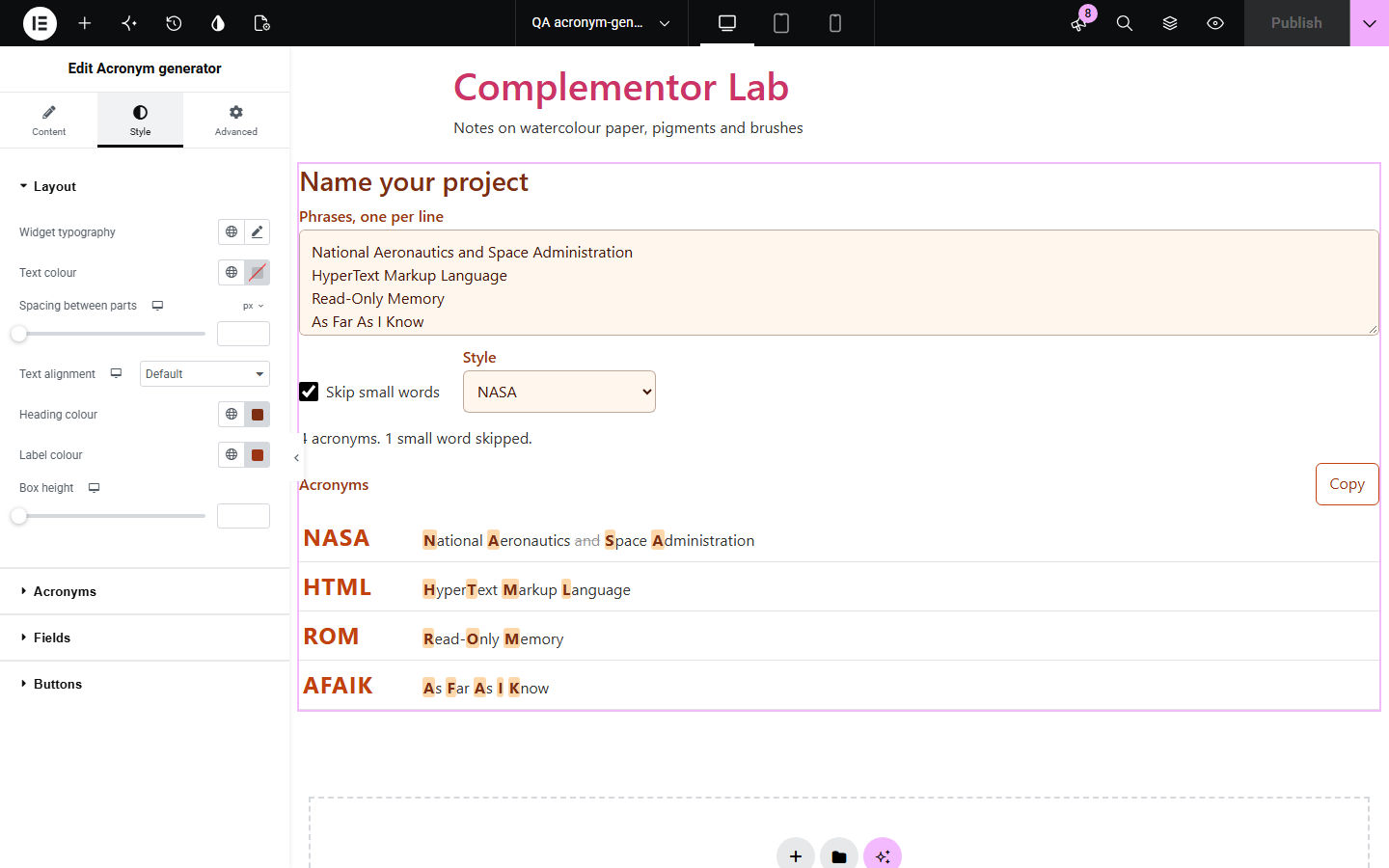
Taking the first letter of every word rarely gives the acronym people expect: small words such as and or of usually drop out, HyperText gives two letters and Read-Only gives two. Acronym generator follows those habits, works on many phrases at once and marks the letters it used in each phrase, so visitors can see exactly how each acronym was made.
Try phrases until the initials spell something good.
Make consistent acronyms for long names.
Show how acronyms are built from phrases.
Start with Complementor installed and your license connected. Enable this module in the WordPress library, then configure it in Elementor.
Install Complementor, connect your license and enable Acronym generator in the Complementor library.
Add the widget to a naming, branding or classroom page.
Type starting phrases, one per line, or leave the box empty.
Choose the style and which words count as small words.
Style the acronyms and marked letters, then type a phrase to check it.
Configure the settings available for this module to suit the page you are building.
One acronym per line of phrases.
Small words such as and, of and the skipped when written in lower case, with an editable list.
Capitals inside words used, so HyperText Markup Language gives HTML.
Each part of a hyphenated word used, so Read-Only Memory gives ROM.
Styles NASA, N.A.S.A. or nasa.
Each phrase shown with the letters used marked and skipped words struck through.
Copy all acronyms, and live updates or a Make button.
Compare the existing Elementor workflow with this Complementor module before choosing your setup.
Removes common words from text.
Reverses text while keeping emoji and accents whole.
Complementor uses classic Elementor APIs. Atomic-native controls are not implemented. Check your theme, cache and integrations on a staging site before release.
Check these settings if the published page behaves differently from the editor.
Small words are skipped only when written in lower case and never as the first word. Write As Far As I Know with capitals to keep each word.
Use capitals inside words is on. Turn it off to use only the first letter of each word.
Each line of the box is a separate phrase. Put a phrase on one line for one acronym.
No. It works with the free version of Elementor.
No. Everything runs in the visitor’s browser.
Yes. Choose the N.A.S.A. style.
Yes. Edit the list of small words in the widget settings.
Yes. Letters with accents, such as É or Å, are kept with their accents.
This module is included with all 1007 current Complementor solutions. Choose your production website allowance; every plan includes the same modules.
Renews at $29 USD each year.
Renews at $49 USD each year.
Renews at $99 USD each year.
Applicable taxes extra. Annual subscriptions renew automatically unless canceled in your customer account. Elementor Pro is required for Exclude current post. Read the terms and 14-day technical-issue refund policy.