Brand reference palette
Show saved Primary and Accent values with exact codes for readers maintaining a brand document.
 I Build Elementor.
Show selected saved ACF Color Picker fields as an ordered labelled palette with optional colour codes.
Explore sample Primary, Accent and Overlay fields with hex and RGBA colours. Switch circle, square or rounded-square swatches and code visibility, or omit a blank field. This read-only illustration does not connect to ACF or select product variations.
Source selects applicable Color Picker fields in saved order. Display has optional colour codes and a native label icon. Style sets inherited label typography, responsive flex alignment, swatch dimensions/gaps, shape, code colour and conditional icon styling.
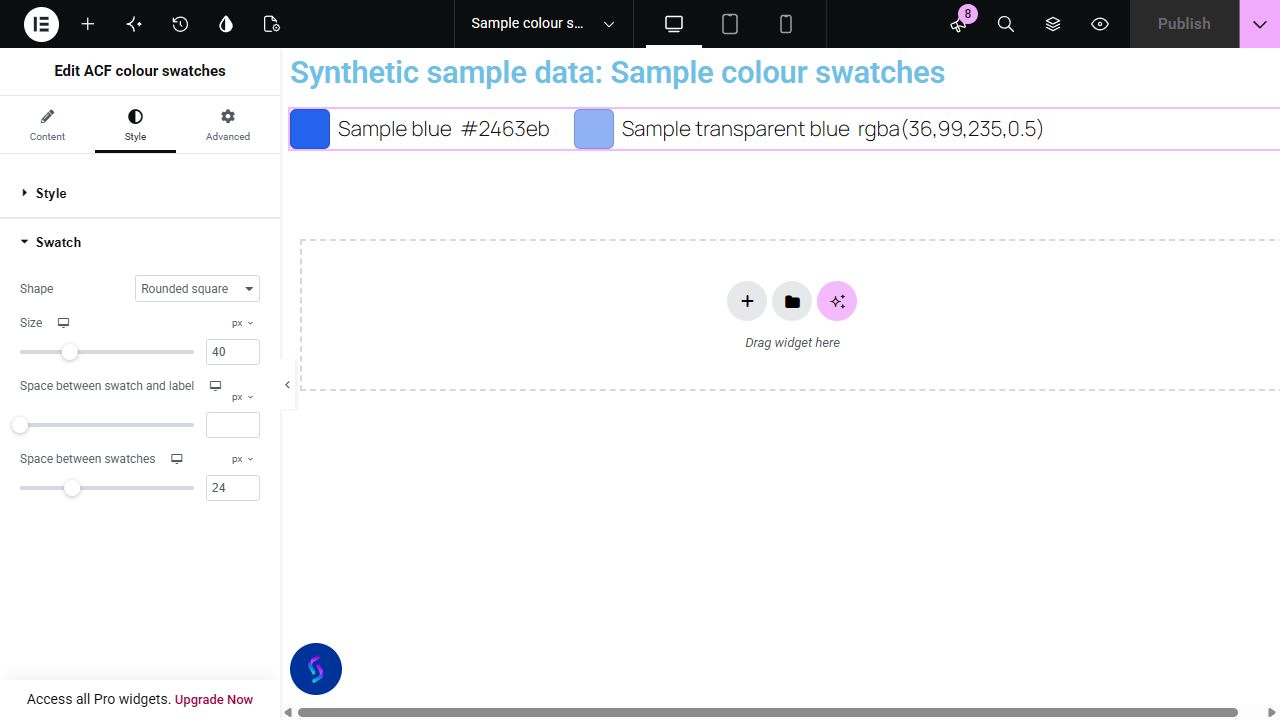
A brand or material reference page may save several colours in separate ACF Color Picker fields. Display those chosen values as one labelled palette without copying each code into a manually styled container.
Show saved Primary and Accent values with exact codes for readers maintaining a brand document.
Display labelled finish colours as editorial reference, without implying selectable product variations or live inventory.
Include a saved RGBA Overlay value beside solid colours. Test its actual background appearance rather than treating alpha as an opaque hue.
Start with Complementor installed and your license connected. Enable this module in the WordPress library, then configure it in Elementor.
Install the reviewed Complementor package with Advanced Custom Fields and classic Elementor, connect your license and enable ACF colour swatches in the module library.
Create applicable top-level ACF Color Picker fields such as Primary, Accent and Overlay. Save their values on a public passwordless post.
Add ACF colour swatches in Elementor and select the desired fields in their display order. Unsaved defaults stay absent.
Choose swatch shape and size. Enable code text when readers need exact values; a field label communicates its role rather than the hue.
Style wrapping, alignment, gaps and optional icons. Publish and verify the saved order and transparency against the actual page background.
Configure the settings available for this module to suit the page you are building.
Ordered multiple applicable top-level Color Picker selector, including local and database field groups. Duplicate key/name aliases render once, malformed selections are skipped and processing is bounded to 50 selections.
Optional validated saved colour code; circle, square or rounded-square swatch shapes.
Inherited label typography/colour; responsive start/centre/end flex justification, swatch size and item/list gaps; conditional code text colour. Shape and size belong to Style.
Optional native decorative label icon off by default, with responsive position/size/gap and colour; native Advanced.
Compare the existing Elementor workflow with this Complementor module before choosing your setup.
Check the ACF dynamic sources supported by your Elementor edition when separate elements need saved colours. This widget groups selected fields into one labelled palette.
A small static palette can use native containers/icons and text labels. The selected-field list reduces repeated editorial copying; it is not exclusive ACF colour support or global-colour synchronization.
Complementor uses classic Elementor APIs. Atomic-native controls are not implemented. Check your theme, cache and integrations on a staging site before release.
Check these settings if the published page behaves differently from the editor.
Check applicable top-level Color Picker schema and actual persisted value. Unsupported named/HSL/space-slash syntax and invalid channel/alpha values are omitted by the bounded allow-list.
The widget reads the raw saved string; the real ACF formatted array API is separate. It does not flatten arbitrary array metadata into CSS.
Field labels describe colour roles and the swatch is decorative. Show code text when exact values matter; no guessed colour names or contrast/accessibility certification is supplied.
The tested allow-list accepts 3/4/6/8-digit hex and bounded comma rgb()/rgba() values. It does not claim every CSS colour grammar.
Saved RGBA values are supported. The widget reads the raw saved string even when ACF formats that field as an array; transparency blends with the page background.
Saved selection order determines output. Style controls shape, size and responsive list alignment; Display controls code visibility and the optional label icon. Labels come from ACF.
No. It is a read-only labelled palette, with no WooCommerce variation selection, visitor colour input or global-colour synchronization.
It displays selected saved ACF colours as a read-only palette. It does not update Elementor global colours.
This module is included with all 1007 current Complementor solutions. Choose your production website allowance; every plan includes the same modules.
Renews at $29 USD each year.
Renews at $49 USD each year.
Renews at $99 USD each year.
Applicable taxes extra. Annual subscriptions renew automatically unless canceled in your customer account. Elementor Pro is required for Exclude current post. Read the terms and 14-day technical-issue refund policy.