Shipping pages
List every destination, grouped by continent.
 I Build Elementor.
Show where your WooCommerce store ships, from the ship-to settings or the shipping zones, as a sentence, a list by continent or chips, with a country checker.
These are the actual published widgets reading the demo store’s shipping settings. Pick a country in the checker.
Shipping countries sets the heading and its tag, where the countries come from (ship-to settings or shipping zones), a sentence, a list in columns or chips, grouping by continent, how many show before Show all, the every-country sentence, the note for partly covered countries, the country checker with its label and messages, and an icon. The Style tab covers the text and surface, the icon, and the heading, country, continent, chip, Show all and checker colours with column width.
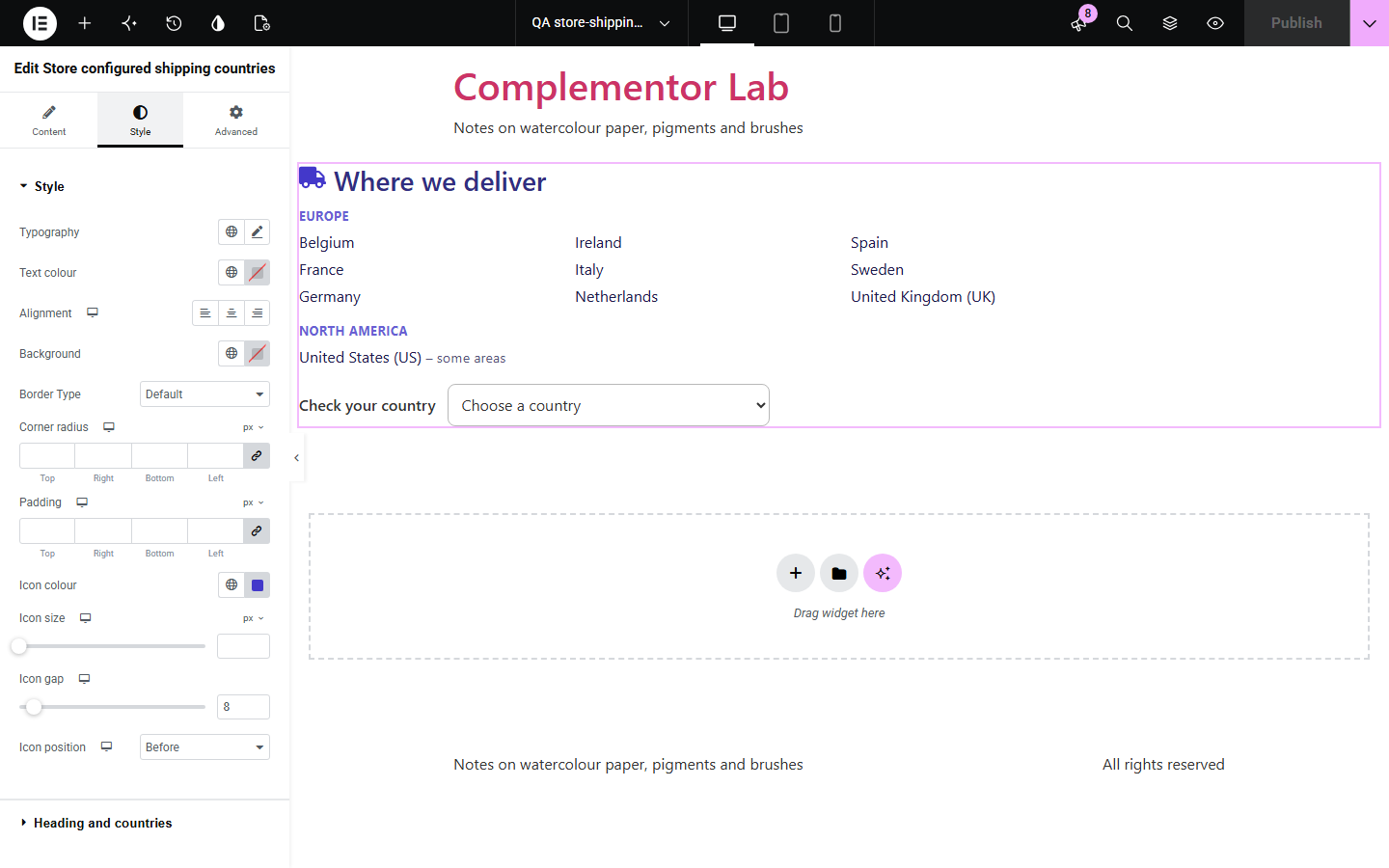
Shoppers want to know whether you deliver to them before they fill a cart, and a hand-typed list drifts from the real settings. This widget reads WooCommerce: the ship-to countries, or only the countries covered by a shipping zone with an enabled method, marking countries covered only in some regions. A store that ships everywhere gets one sentence instead of 250 names, long lists fold behind Show all, and an optional checker answers for the chosen country.
List every destination, grouped by continent.
Let shoppers check their country before buying.
A short “We ship to” sentence.
Start with Complementor installed and your license connected. Enable this module in the WordPress library, then configure it in Elementor.
Install WooCommerce and Complementor, connect your license and enable Store configured shipping countries in the Complementor library.
Set the ship-to countries and shipping zones in WooCommerce settings.
Add the widget to a shipping, FAQ or footer section.
Choose the source, the layout and how many countries show.
Turn on the country checker and adjust its messages if you like.
Configure the settings available for this module to suit the page you are building.
Ship-to countries from WooCommerce settings, or only countries with an active shipping zone.
A sentence, a list in columns grouped by continent, or chips.
One sentence when the store ships to every country.
A Show all disclosure for long lists, which works without scripts.
Countries covered only in some regions or postcodes marked.
A country checker with yes, partly and no messages.
Compare the existing Elementor workflow with this Complementor module before choosing your setup.
A menu of product brands.
A menu of product categories.
Complementor uses classic Elementor APIs. Atomic-native controls are not implemented. Check your theme, cache and integrations on a staging site before release.
Check these settings if the published page behaves differently from the editor.
The store ships to all countries. Turn off the one-sentence option to list them, or use shipping zones as the source.
The zone has no enabled shipping method, or the country is not a ship-to country in WooCommerce › Settings › General.
Its shipping zone is limited to regions or postcodes. Change the note text or the zone if that is not intended.
No. It works with the free version of Elementor and WooCommerce.
Yes. It reads WooCommerce’s settings each time the page is built.
No. It shows where you ship; rates are worked out at checkout.
Yes. Without scripts the checker stays hidden and the country list still shows.
Yes. Lists are named by their headings, the checker has a label, and its answer is announced by screen readers.
This module is included with all 1007 current Complementor solutions. Choose your production website allowance; every plan includes the same modules.
Renews at $29 USD each year.
Renews at $49 USD each year.
Renews at $99 USD each year.
Applicable taxes extra. Annual subscriptions renew automatically unless canceled in your customer account. Elementor Pro is required for Exclude current post. Read the terms and 14-day technical-issue refund policy.