A compact physical-product specification
Show saved dimensions and weight beside a product description, with labels when needed to identify length, width and height.
 I Build Elementor.
Show selected WooCommerce product dimensions and weight in the store’s saved units.
Explore sample length 30 in, width 20 in, blank height and weight 1.5 lbs. Select quantities, edit optional labels, choose blank-field handling and move weight to its own line. Store units remain fixed; no shipping-rate calculation or unit conversion is performed.
Choose Current product, the existing Selected product (by ID) option, or Product ID. Toggle length, width, height and weight, then set labels, missing-data behavior and responsive layout.
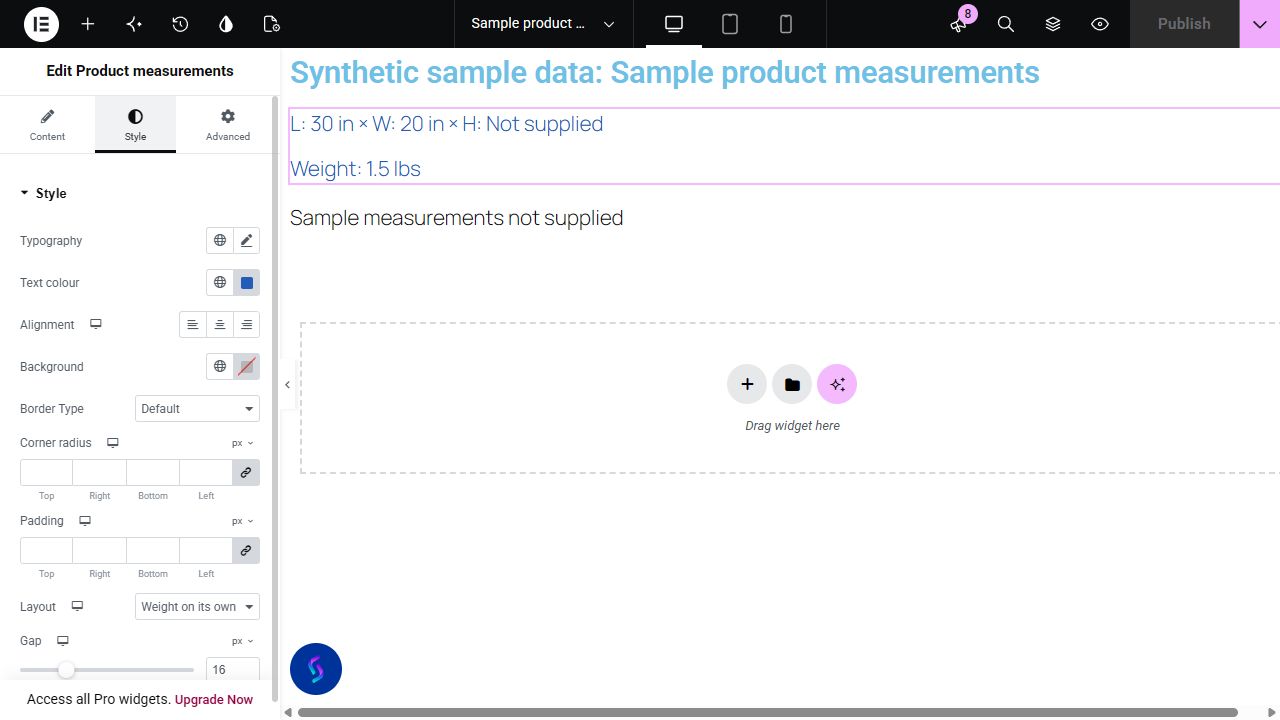
A product page can need a compact measurement line outside the complete Additional information table. Display selected WooCommerce measurement fields in the store's units, while making missing data and packaging meaning clear.
Show saved dimensions and weight beside a product description, with labels when needed to identify length, width and height.
Turn off the dimension fields to present only the saved parent weight. Missing fields can be skipped rather than turning the display into a row of placeholders.
When a product has weight but no dimensions, retain the known weight and choose how missing dimensions appear. If all selected fields are blank, show a clear message or hide the whole widget.
Start with Complementor installed and your license connected. Enable this module in the WordPress library, then configure it in Elementor.
Use the internal reviewed Complementor development candidate with WooCommerce and classic Elementor active. Enable this module explicitly in the module library on staging; customer availability is pending release acceptance.
Set measurement units in WooCommerce settings. Save the public product's length, width, height and weight in its Product data shipping fields when those fields apply.
Add Product measurements and choose the current product, legacy Selected product ID or the explicit Product ID source. Parent products are used; variation IDs are excluded.
Select fields, labels and dimension separator. For partially blank data, skip missing fields or show placeholders; when every selected raw field is blank, hide the widget or show a custom message.
Set inline or separate-line weight layout and responsive gaps. Optionally enable an icon. Confirm the figures describe the intended product/shipping measurements, then validate published and mobile output before release.
Configure the settings available for this module to suit the page you are building.
Source: current public product or explicit strict positive parent Product ID; the existing selected-ID source remains supported.
Independent length, width, height and weight toggles, editable field labels, show-labels switch and dimension separator.
Partial missing fields: skip or editable placeholder. All selected raw fields blank: hide or editable whole-widget text, with whole-widget handling taking precedence.
Responsive dimensions/weight inline or weight-on-own-line layout, measurement gap and separate icon gap. Store-configured units appear on each populated field.
Optional native Elementor icon, off by default; conditional icon color and responsive before/after position, size and gap.
Text typography and color; background, border, responsive alignment, padding and corner radius. Native Advanced controls remain available.
Compare the existing Elementor workflow with this Complementor module before choosing your setup.
WooCommerce already exposes stored weight and dimensions in Additional information, and Elementor's builder includes that widget. Prefer the native table when complete details are appropriate; this candidate supplies a separate field-selected line.
If the item's own size differs from its shipping fields, save a dedicated product attribute and present that fact. Do not change shipping measurements solely to alter a display line.
Complementor uses classic Elementor APIs. Atomic-native controls are not implemented. Check your theme, cache and integrations on a staging site before release.
Check these settings if the published page behaves differently from the editor.
The widget reads WooCommerce's stored measurement fields. Verify what those values mean for your store and label them accordingly; use a separate attribute for a different item-size specification.
The whole-widget empty setting takes precedence when no selected raw measurement exists. Placeholder behavior applies only when at least one selected field has actual data.
This module reads the parent product and does not listen to variation selections. Per-variation measurement display requires a different validated workflow.
Check WooCommerce's configured weight and dimension units. This widget displays saved values with those units; it does not convert quantities between unit systems.
That is intentional. Blank placeholder text is skipped to avoid separator-only content. Enter a visible placeholder if needed, or show a whole-widget empty message when all selected raw fields are blank. Empty field labels omit their colon.
Yes. Independently choose length, width, height and weight. The responsive layout can place weight with dimensions or on its own line.
No. It only displays saved measurement data and configured units. It does not contact a carrier or change checkout rates.
No. Parent measurements are read. Explicit variation IDs and variation-change updates are outside the documented scope.
For partial data, choose a field placeholder. When every selected raw field is blank, the whole-widget hide or message setting takes precedence.
No. Actual local native product and selected-ID tests passed, but Theme Builder, Pro, Loop Grid and published browser/mobile verification remain outstanding.
This module is included with all 1007 current Complementor solutions. Choose your production website allowance; every plan includes the same modules.
Renews at $29 USD each year.
Renews at $49 USD each year.
Renews at $99 USD each year.
Applicable taxes extra. Annual subscriptions renew automatically unless canceled in your customer account. Elementor Pro is required for Exclude current post. Read the terms and 14-day technical-issue refund policy.