A simple product's sale fact
Show 25% OFF when the product's regular price is 100 and effective sale price is 75. The label supplements the store's prices rather than replacing them.
 I Build Elementor.
Show a calculated WooCommerce sale percentage with rounding and an optional largest-variation policy.
Compare a simple sample sale from 100 to 75 (25% OFF), a largest eligible variable-child example (40% OFF), and a no-sale message. These samples change no real prices or carts.
Choose a product source, rounding and variable-product policy. Edit the suffix and not-on-sale behavior, then optionally choose an icon. These controls display a computed fact; they do not apply a discount.
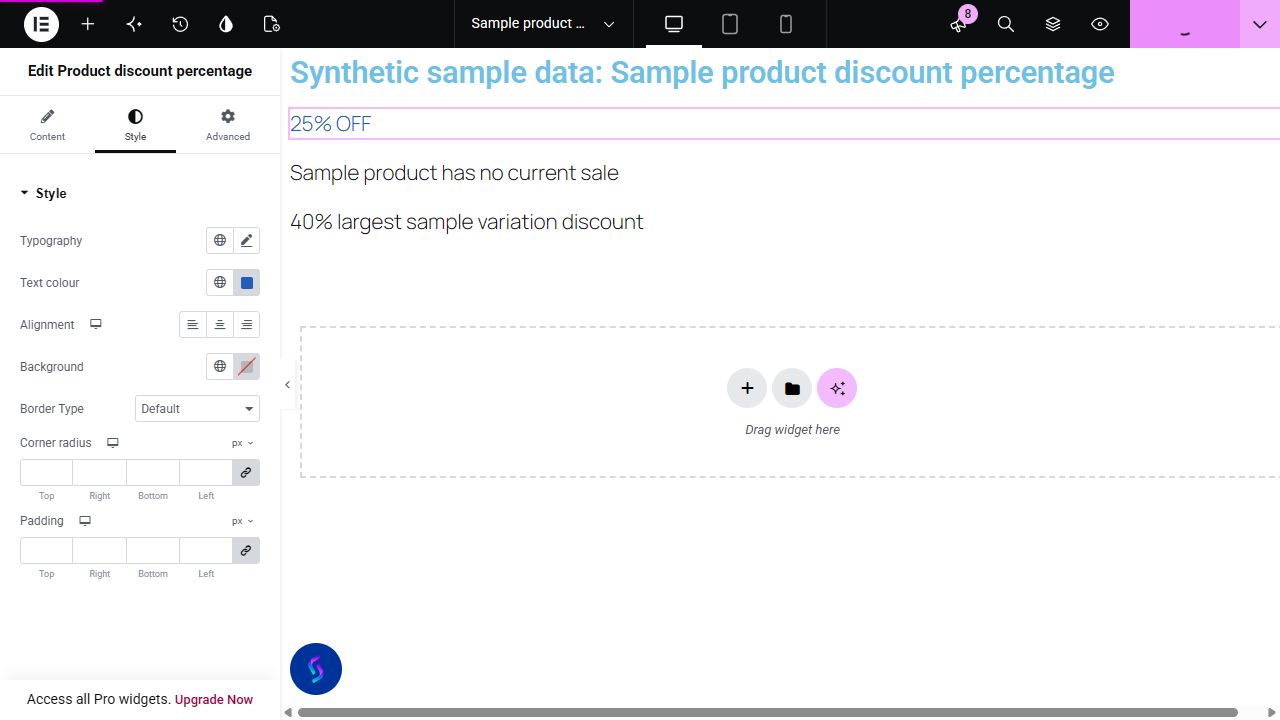
A crossed-out price tells customers the amounts but may not explain the percentage saved. This widget computes a product's current sale percentage from its own regular and effective price, with a clear variable-product policy.
Show 25% OFF when the product's regular price is 100 and effective sale price is 75. The label supplements the store's prices rather than replacing them.
Use the largest-variation policy with surrounding text that makes the maximum clear. Keep the default hide policy when one percentage would mislead readers.
Enter a public Product ID for a featured product outside the convenience picker. The percentage reads that product's current sale data rather than hardcoded campaign text.
Start with Complementor installed and your license connected. Enable this module in the WordPress library, then configure it in Elementor.
Use the internal reviewed Complementor development candidate with WooCommerce and classic Elementor active. Enable this module explicitly in the module library on staging; customer availability is pending release acceptance.
Save a real regular price and active sale price on a public product in WooCommerce. For variable products, save prices on the relevant variations.
Add Product discount percentage. Choose Current product, a convenience product selection or explicit Product ID.
Choose nearest, down or up rounding. Variable products hide by default; choose largest active variation discount only when that meaning fits the page.
Edit the text after the number and no-sale behavior. Configure the optional icon and Style controls, then verify live prices, output and cache behavior on staging before release.
Configure the settings available for this module to suit the page you are building.
Source: current product, a published-product convenience list capped at 200, or strict positive Product ID.
Rounding: nearest integer, floor or ceiling. A result that is not positive is hidden or follows the empty-output setting.
Variable policy: hide by default or show the largest computed percentage among published, visible, non-password-protected child variations currently on sale; no average or parent-price approximation.
Editable text after the number, and hide or custom text when no positive current discount is available.
Optional native Elementor icon, off by default; conditional icon color and responsive before/after position, size and gap.
Text typography and color; background, border, responsive alignment, padding and corner radius. Native Advanced controls remain available.
Compare the existing Elementor workflow with this Complementor module before choosing your setup.
Elementor documents native regular/sale price presentation and styling. Use it when the price amounts are sufficient. This candidate adds a separate computed integer percentage; it does not replace the price widget.
Check the existing theme or WooCommerce extension first for the exact sale-badge scope needed. This widget is separately placed text, not an automatic replacement for badges across archives or loops.
Complementor uses classic Elementor APIs. Atomic-native controls are not implemented. Check your theme, cache and integrations on a staging site before release.
Check these settings if the published page behaves differently from the editor.
Check WooCommerce's current on-sale state, effective price and regular price. A future sale, invalid regular price or rounded result of zero can be hidden. Variable products also hide under the default policy.
Largest active variation discount reports the maximum. It is not a universal discount. Use clear nearby copy or choose Hide for variable products.
Coupon and cart-rule savings are outside this product-price calculation. Verify the product's regular/effective price and refresh page/CDN caches after a sale change.
The largest policy uses actual published, visible, non-password-protected children on sale. Check each eligible variation’s current regular and effective price, native visibility and page cache. It does not use a parent price approximation or react to the shopper’s dropdown selection.
No. It displays a percentage computed from existing WooCommerce sale data. Prices, coupons and checkout remain unchanged.
For a currently on-sale product, the calculation is (regular price minus effective price) divided by regular price, multiplied by 100, then rounded with the chosen policy.
Variable products hide by default. An optional policy reports the largest active variation discount; it does not average variations or react to the shopper's selection.
No. It is a separate widget for a current or explicitly chosen product. Archive badges, Loop Grid and Theme Builder contexts are unverified.
Actual local WooCommerce/Elementor render and control checks passed. Pro templates, browser/mobile styling and other pricing extensions have not been validated.
This module is included with all 1007 current Complementor solutions. Choose your production website allowance; every plan includes the same modules.
Renews at $29 USD each year.
Renews at $49 USD each year.
Renews at $99 USD each year.
Applicable taxes extra. Annual subscriptions renew automatically unless canceled in your customer account. Elementor Pro is required for Exclude current post. Read the terms and 14-day technical-issue refund policy.