Material beside a product description
Show Material: Cotton, Linen as a short text fact. A custom attribute name and a separator make the output readable without a full attribute table.
 I Build Elementor.
Show one saved WooCommerce global or custom product attribute with an editable label and separator.
Explore sample Material values Cotton and Linen, an alternative separator and a configured missing-attribute message. This illustration reads no WooCommerce products and does not update selected variations.
Select the current product, a product from the convenience picker or an explicit Product ID. Choose Global attribute or Custom attribute, then configure the label and empty output.
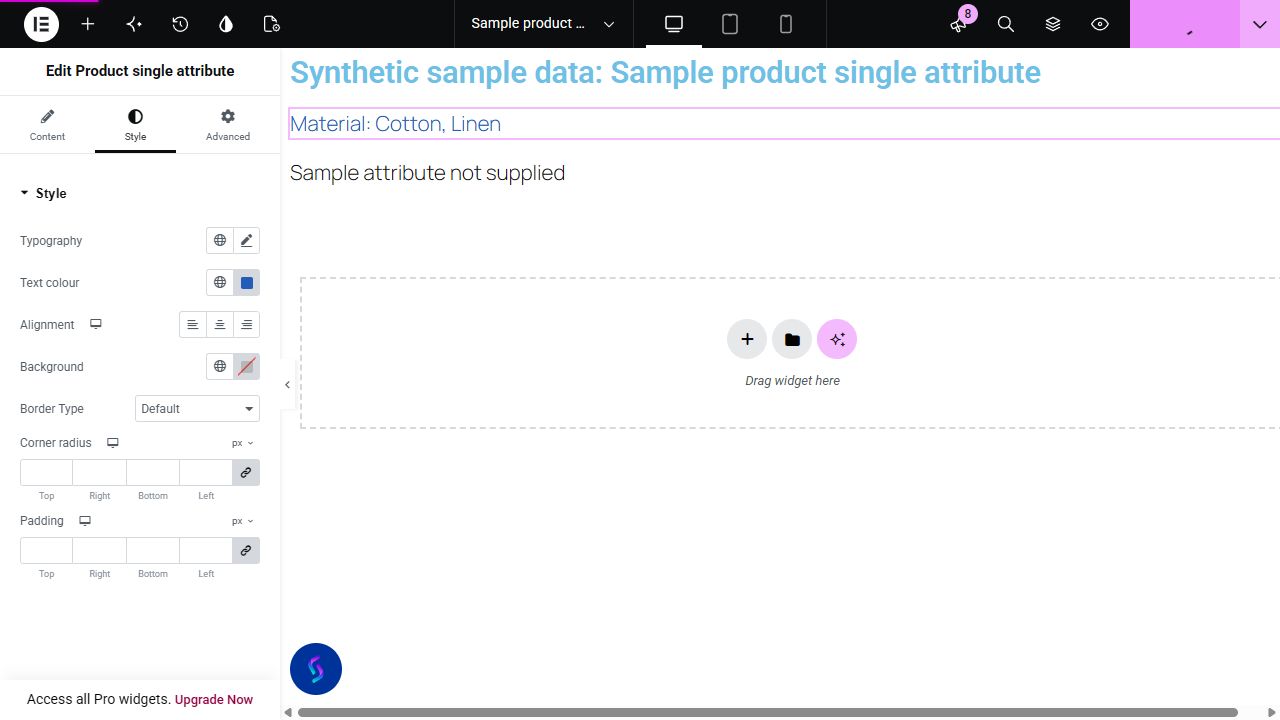
A product page may need Material: Cotton, Linen near a description without repeating the complete Additional information table. This widget displays exactly one chosen product attribute with its own label and separator.
Show Material: Cotton, Linen as a short text fact. A custom attribute name and a separator make the output readable without a full attribute table.
Read a saved Package size attribute. Use a deliberate label so customers understand whether the value describes the item or its package.
Use the product's ID when it is outside the 50-item convenience picker. The widget reads that one public product rather than guessing from the page context.
Start with Complementor installed and your license connected. Enable this module in the WordPress library, then configure it in Elementor.
Use the internal reviewed Complementor development candidate with WooCommerce and classic Elementor active. Enable this module explicitly in the module library on staging; customer availability is pending release acceptance.
In WooCommerce, save a global attribute and assign its terms to a public product, or add a custom per-product attribute such as Material with its option values.
Add Product single attribute to your staging Elementor page. Choose Current product in an actual product context, Selected product, or Product ID for an explicit public product.
Choose the global taxonomy attribute from its selector, or Custom attribute and enter its saved name. Custom-name matching is case-insensitive; labels are not taxonomy identifiers.
Edit the optional label and separator, then choose hide or an empty message. Optionally enable an icon and set Style controls. Verify the real published page and mobile layout before release.
Configure the settings available for this module to suit the page you are building.
Source: current product, a convenience selection from the first 50 published products, or a strict positive Product ID for any public parent product.
Attribute type: registered WooCommerce global taxonomy declared on the chosen product, or a custom attribute identified by its saved name. Only the chosen values are joined; unrelated taxonomies and undeclared leftover terms are excluded.
Editable label before the value, editable separator, and missing-attribute hide or custom-text behavior.
Optional native Elementor icon, off by default; conditional icon color and responsive before/after position, size and gap.
Text typography and color; background, border, responsive alignment, padding and corner radius. Native Advanced controls remain available.
Compare the existing Elementor workflow with this Complementor module before choosing your setup.
Elementor's WooCommerce builder includes an Additional Information widget. Prefer the native full-information workflow when the complete product details are wanted; this candidate focuses on one attribute at a chosen location.
A normal text widget is enough for an intentionally manual fact. Custom template code or a shortcode can read an attribute when your team maintains that implementation; Complementor supplies a focused control panel.
Complementor uses classic Elementor APIs. Atomic-native controls are not implemented. Check your theme, cache and integrations on a staging site before release.
Check these settings if the published page behaves differently from the editor.
The convenience list stops at 50 published products. Choose Product ID and enter the public parent product's integer ID; a variation ID or protected product is rejected.
Confirm values were saved on the chosen public parent product. Global mode requires a registered WooCommerce attribute assigned as a product attribute, not only a leftover term relationship. Custom mode uses the saved attribute name. Product categories, tags and ACF fields are different sources.
Test an explicit Product ID first. Current-product Theme Builder and Loop Grid preview context has not passed browser verification; do not infer template compatibility from a normal product fixture.
This candidate reads one selected global or custom parent-product attribute and formats its values with an editable separator and label.
Yes. Product ID accepts a strict positive integer and reads that public parent product. The first 50 items are only a convenience list.
No. It displays parent-product attribute values. It does not listen to variation selection or accept an explicit variation ID.
The direct WooCommerce reader uses classic Elementor APIs without Pro dynamic tags. Theme Builder, Loop Grid and Pro integration are not verified.
It is staged in development and has passed local native checks. Released packaging, authentic editor screenshots and frontend/mobile acceptance are still pending.
This module is included with all 1007 current Complementor solutions. Choose your production website allowance; every plan includes the same modules.
Renews at $29 USD each year.
Renews at $49 USD each year.
Renews at $99 USD each year.
Applicable taxes extra. Annual subscriptions renew automatically unless canceled in your customer account. Elementor Pro is required for Exclude current post. Read the terms and 14-day technical-issue refund policy.