Clothing and sizes
Show 'From £24.00 up to £36.00' for products whose sizes or colours are priced differently.
 I Build Elementor.
Show a WooCommerce variable product's lowest and highest current price with your own labels, such as From £24.00 up to £36.00.
These are the actual published outputs of the widget for sample variable products: default labels, a From / up to pill with an icon, a stacked layout, a product whose variations all cost the same, and a product with no priced variations.
Content › Source uses the current product or a selected published variable product. Behaviour sets the separator, the label used when all prices are equal and the fallback text. Display turns labels on or off, edits the minimum and maximum labels and adds an optional icon. The Style tab covers the summary's typography, colour, alignment, background, border, radius, padding, direction, gap and separator visibility, plus label, price and separator styling and icon colour, size and gap.
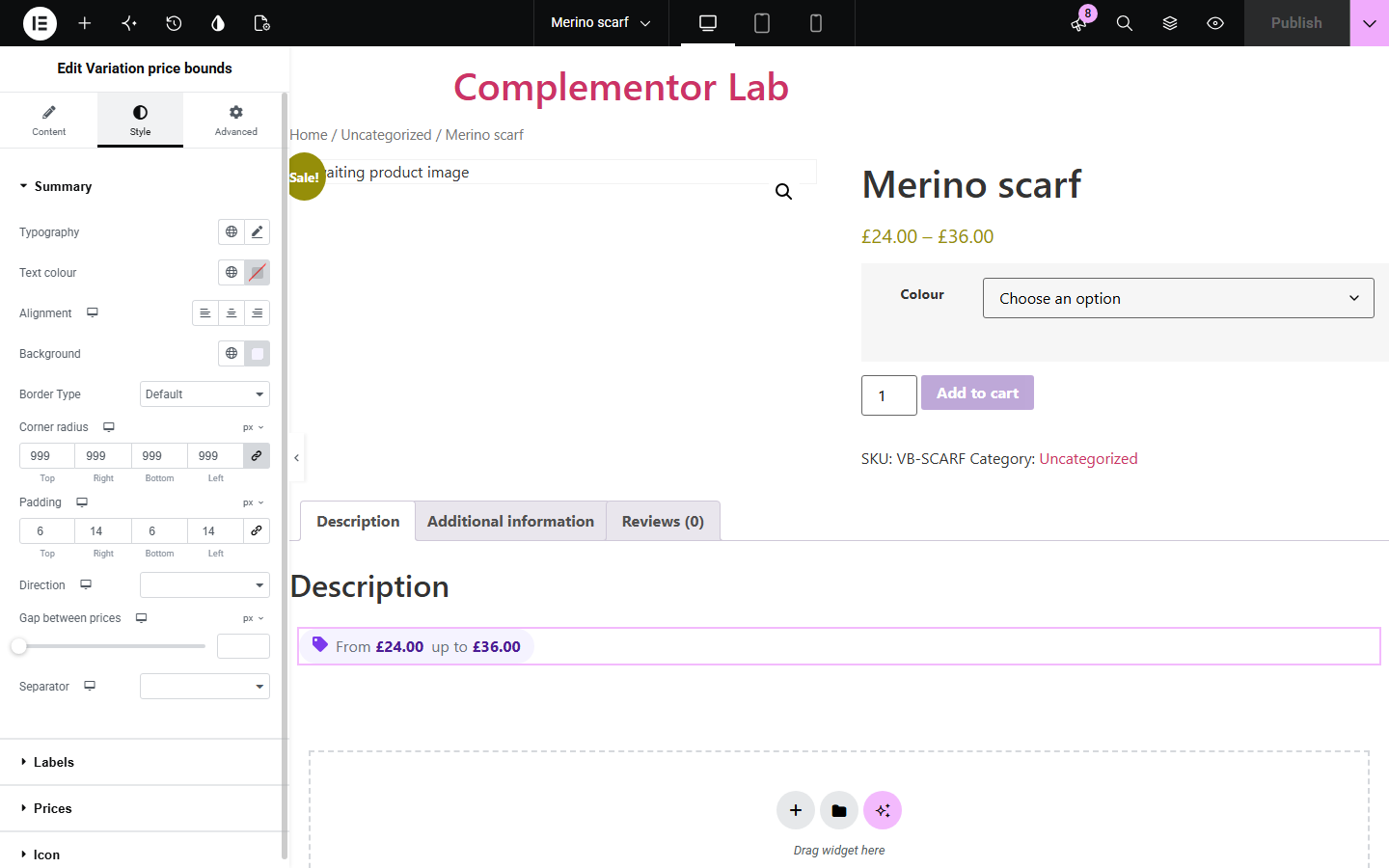
WooCommerce shows a variable product's price as a bare range such as £24.00 – £36.00, which some shoppers misread. Variation price bounds shows the same lowest and highest current prices with labels you write, such as 'From' and 'up to', a separate label when every option costs the same, and your own text when no option has a price yet.
Show 'From £24.00 up to £36.00' for products whose sizes or colours are priced differently.
Use one template for every variable product; products with a single price show it once with its own label.
Show 'Price on request' while variations have no price yet.
Start with Complementor installed and your license connected. Enable this module in the WordPress library, then configure it in Elementor.
Install Complementor and WooCommerce, connect your license and enable Variation price bounds in the Complementor library.
Make sure the variable product's variations are published and priced in WooCommerce.
Add the widget to a single product template or variable product page, or choose a Selected variable product in Content › Source.
Write the minimum and maximum labels, the separator, the equal-price label and the fallback text.
Style the labels and prices, publish, and compare with the product's own price range.
Configure the settings available for this module to suit the page you are building.
Source: the current product, or a selected published variable product from a picker.
Lowest and highest current prices from WooCommerce, including active sales and your tax display setting.
Editable minimum and maximum labels, or no labels.
Editable separator, equal-price label and fallback text for products with no priced variations.
Optional icon with colour, size and gap.
Style: summary surface, side-by-side or stacked direction, gap, separator visibility, and label, price and separator typography and colour.
Compare the existing Elementor workflow with this Complementor module before choosing your setup.
WooCommerce and Elementor Pro's Product Price widget already show the range with sale formatting and price suffix. Use them when the bare range is enough; use this widget when you need labels, a separate equal-price label or fallback text.
WooCommerce's price suffix adds the same text after every price. This widget labels the lowest and highest prices separately without code.
Complementor uses classic Elementor APIs. Atomic-native controls are not implemented. Check your theme, cache and integrations on a staging site before release.
Check these settings if the published page behaves differently from the editor.
No published variation has a price. Set prices on the variations, or leave the fallback text empty to show nothing.
Only variations WooCommerce shows are used: published, priced, and in stock when Hide out of stock items is on.
The source must be a published variable product without a password. Simple, grouped and external products are not supported; the editor shows a hint.
The widget summarises the whole product. It does not react to the option a shopper selects.
Yes. It uses each variation's current price, so an active sale counts and a scheduled future sale does not.
No. It works with Elementor and WooCommerce; Elementor Pro lets you place it in single product templates.
Yes. Prices follow WooCommerce › Settings › Tax › Display prices in the shop.
No. It shows only the current lowest and highest prices, with no strike-through or price suffix.
No. It shows both bounds, or one price when they are equal. Use the From label with WooCommerce's own price if you only need a minimum.
This module is included with all 1007 current Complementor solutions. Choose your production website allowance; every plan includes the same modules.
Renews at $29 USD each year.
Renews at $49 USD each year.
Renews at $99 USD each year.
Applicable taxes extra. Annual subscriptions renew automatically unless canceled in your customer account. Elementor Pro is required for Exclude current post. Read the terms and 14-day technical-issue refund policy.