Coupon codes beside an offer
Display a code such as HELLO10 next to a promotion. Visitors can copy the exact code instead of retyping it; applying that discount remains the responsibility of your checkout.
 I Build Elementor.
Let visitors copy a code, address or any short text with one click.
Try native-rendered examples for a default button, coupon code, email address and empty value in the isolated demo. The demo loads the shipped copy handler and native Elementor styles; it uses sample text, not your site data.
Enter Text to copy and Button label in Content source. Behaviour contains success, error and empty-text feedback. Display controls the visible text; Icon selects the optional native icon. Style separates the button, displayed text, layout and feedback.
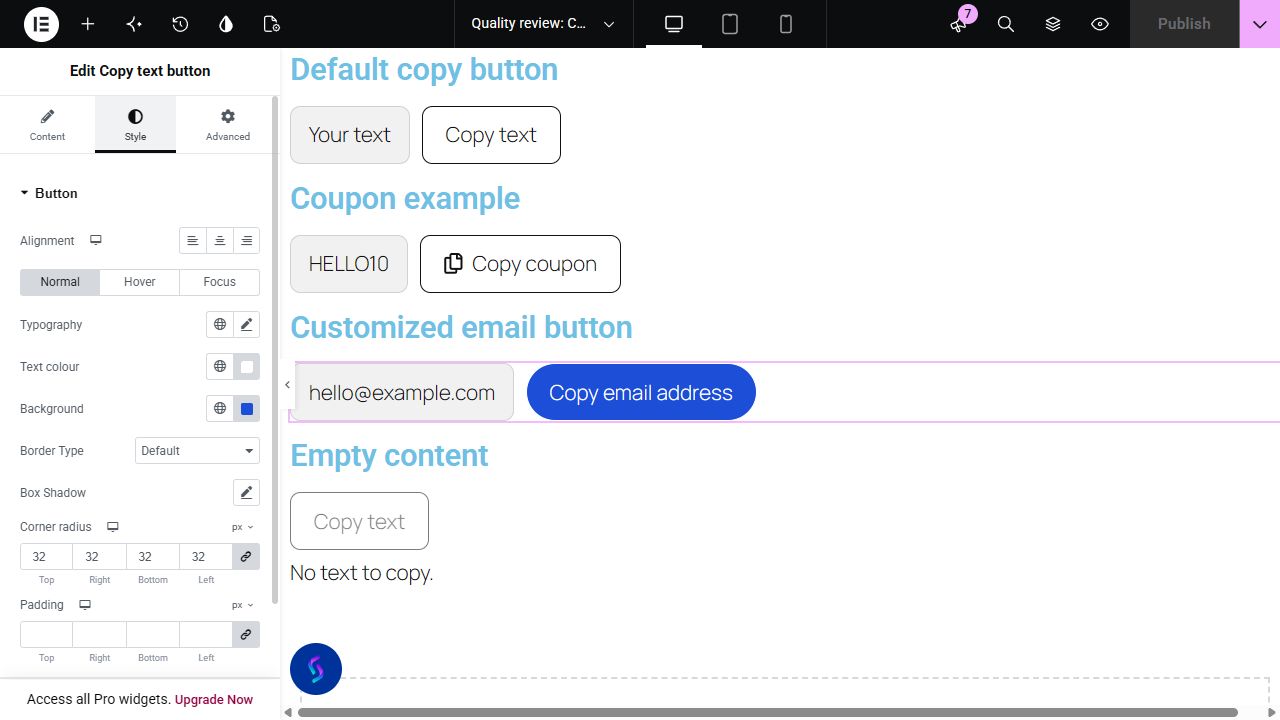
A coupon code or contact address is easier to use when visitors can copy it directly. This Elementor widget places a copy button beside your text, with a success message after the visitor copies it. Use it for plain-text coupon codes, reference numbers, email addresses or other text you want visitors to reuse.
Display a code such as HELLO10 next to a promotion. Visitors can copy the exact code instead of retyping it; applying that discount remains the responsibility of your checkout.
Offer a copy action for visitors who prefer to paste your address into their own mail application. A clear label tells them what will be placed on the clipboard.
Copy an account reference, booking code or plain-text instruction from a page. Keep sensitive information out of public pages and choose a label that describes the copied text.
Start with Complementor installed and your license connected. Enable this module in the WordPress library, then configure it in Elementor.
Install Complementor, connect your license and enable Copy text button in the WordPress module library.
Edit the page with Elementor, add Copy text button and enter Text to copy in Content source. Give the button a clear label describing the copied value.
Set success, error and empty-text feedback in Behaviour. Choose whether the clipboard text is visible in Display and optionally select an icon in Icon.
In Style, adjust the button’s typography, surface and Normal/Hover/Focus states. Set icon spacing, text/button layout and displayed-text styling separately.
Publish, reopen the editor to confirm saved settings, then test keyboard activation, copied text and fallback feedback on the HTTPS page.
Configure the settings available for this module to suit the page you are building.
Text to copy and Button label support the Elementor dynamic tags available on your site.
Set success, error and empty-text messages. Show or hide the text beside the button; empty clipboard text disables the copy action.
Choose an optional icon from Elementor’s native icon selector. Place it before or after the label; set its color and responsive size and gap.
Customize typography and Normal, Hover and Focus styles, including the focus outline. Configure responsive padding, corner radius and alignment. Displayed text, feedback text and text/button layout have separate controls.
The button label and selected icon remain visible while a separate accessible status announces success or failure. An unsuccessful copy reveals a selectable text field, including when displayed text is hidden.
Compare the existing Elementor workflow with this Complementor module before choosing your setup.
Elementor Pro’s Code Highlight widget already includes a copy-to-clipboard control for code examples. Use it when you need syntax highlighting and a code box; Complementor offers a standalone plain-text button for codes and addresses.
If another installed addon already gives you a suitable copy button, you can keep using it. A custom clipboard script is another option, but you must maintain its browser fallback, feedback and styling yourself.
Complementor uses classic Elementor APIs. Atomic-native controls are not implemented. Check your theme, cache and integrations on a staging site before release.
Check these settings if the published page behaves differently from the editor.
Test on HTTPS and activate the button directly. Browser restrictions can reject clipboard access. The widget attempts a legacy fallback; if both methods fail, it reveals a selectable readonly field even when displayed text is hidden.
Text to copy and Button label are separate. Check the clipboard source in Content source, including any available dynamic tag, then refresh cached HTML and test the published page.
Empty or whitespace-only clipboard text disables copying and uses your empty-text explanation. There is no displayed-text chip until nonempty text is supplied. A blank button label falls back to Copy text.
Your success message appears in a separate status below the button. The visible button label and selected icon stay in place.
Yes. Enter the code as Text to copy and use a label such as Copy code. The button copies the code; your checkout still handles applying it.
The source and label support available native Elementor dynamic tags. Providers depend on your edition and integrations; an ACF value requires the appropriate dynamic-tag integration.
Yes. Turn off displayed text. If automatic copying fails, a selectable manual field can still show the clipboard text for recovery.
Yes. Select an optional native icon, place it before or after the label and adjust its color, size and gap. Native border, radius, padding and state controls style the button.
Empty or whitespace-only source text disables the action and displays your empty-text explanation. It does not copy a fabricated placeholder.
This module is included with all 1007 current Complementor solutions. Choose your production website allowance; every plan includes the same modules.
Renews at $29 USD each year.
Renews at $49 USD each year.
Renews at $99 USD each year.
Applicable taxes extra. Annual subscriptions renew automatically unless canceled in your customer account. Elementor Pro is required for Exclude current post. Read the terms and 14-day technical-issue refund policy.